You live with your condition every day. Your doctor sees it for a few minutes every few months. In between, a month of good and bad days blurs into "some good, some bad," and the details that could explain a flare, like a run of short nights or a few missed doses, never make it into the exam room. Sharing your TakeCare data closes that gap, on your terms.
Here's how sharing works, what your clinician sees, and how you stay in control the whole time.
Why share at all?
Appointments are short, and memory is unreliable, especially when you're tired or in pain. When your clinician can see what actually happened, the visit changes:
- Less time reconstructing the past. Instead of "How have things been?", the conversation starts from your real sleep, doses, meals and symptom ratings.
- Problems caught earlier. A clinician who follows your data can notice a slide, like shorter nights or more missed doses, before the next appointment.
- Better decisions about treatment. Did the new prescription help, or did the flares settle on their own? Day-by-day data makes that much easier to judge.
- Food and lifestyle advice that fits. A dietitian or health coach can see what you really eat and how it lines up with how you feel.
Who you can share with
Anyone who uses the TakeCare clinician portal: physicians, nurse practitioners, physician assistants, registered dietitians, health coaches, pharmacists, therapists and physical therapists. Each one has a personal connect code that looks like K7QM-4RTX. They might hand it to you at a visit, put it on a brochure in the waiting room, or email it to you.
If your clinician doesn't use TakeCare yet, you can point them to takecarehealth.org/clinicians.
How to share, step by step
- Open TakeCare and go to Profile, then Share with My Doctor.
- Type in your clinician's connect code and tap Find Doctor.
- Check that the name and specialty that appear are the person you expect.
- On Choose What to Share, turn on only the categories you want them to see.
- Confirm. Your clinician will see you in their patient list right away.
You can share with more than one clinician. Each gets their own connection, with its own choices, so your dietitian might see your meals while your cardiologist sees your medications and sleep.
What you can choose to share
Every category is your choice:
- Profile & goals: age, sex, height, weight and the goals you set
- Health conditions: your conditions, allergies, medical history and lifestyle, like smoking and alcohol
- Medications: your medication list and the doses you log
- Meals & nutrition: what you eat and drink, with the nutrition behind it
- Sleep: your nights, including stages if your watch records them
- Activity: steps and workouts
- Symptom severity: your ratings and the notes you add to them
- Carey's AI insights: your Daily Reports and Root Cause Explorer results. Carey writes these from everything you log, so they can mention categories you don't otherwise share
Your name and email are always shared, so your clinician can recognize you in their list. Nothing else is shared unless you turn it on.
What your clinician sees
Your clinician views your data in the TakeCare clinician portal, a secure website they sign in to with two-step verification. It organizes what you share the way they think about it: medication adherence and dose timing, nutrition against daily limits, sleep stages night by night, activity, and how your symptom ratings move with everything else.
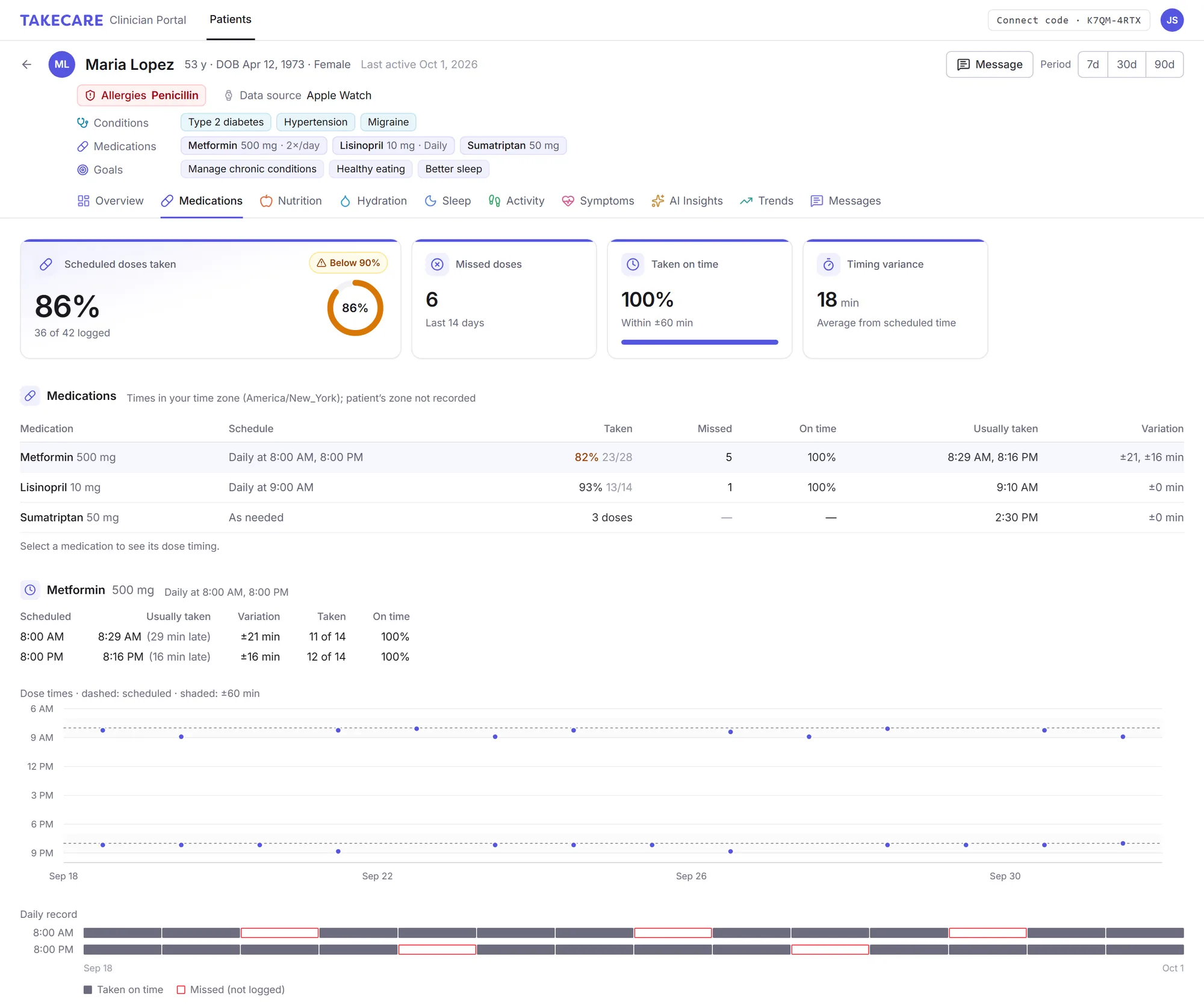
A clinician's view of a demo patient's medications in the TakeCare portal.
The portal also flags things worth their attention, like a run of very short nights, several missed doses, or a note that mentions something like chest pain. That doesn't replace calling your doctor or emergency services when you need to, but it does help your care team spot changes between visits.
Messages from your clinician
Clinicians can send you short, one-way notes through TakeCare, like encouragement, a reminder about a lab test, or a next step to try. You'll get a notification and find the message on your home screen. You can't reply in TakeCare, so your clinician should include how to reach them.
Don't want messages? Turn them off for that clinician in Share with My Doctor, or straight from one of their messages. Your data keeps flowing to them; only the messages stop.
Changing your mind
You're in control for as long as you share:
- Edit what you share: go back to Share with My Doctor, tap Edit next to your clinician, and turn categories on or off.
- Stop sharing: tap Stop. Your clinician immediately loses access to your data.
Is it free?
Yes. Sharing with your clinician is free for you, with or without TakeCare Pro. Your clinician pays for the portal, not you.
No portal? Bring a report instead
If your clinician doesn't use TakeCare, you can still bring your data. Open History, choose a date range, and export a PDF report (Pro) of your meals, medications, sleep, activity and symptoms to print or email before your appointment.
The bottom line
Your clinician can only work with what they can see. Sharing your TakeCare data gives them the days between visits, while you decide exactly what they see and for how long. Ask your doctor, dietitian or coach whether they use TakeCare. It might be the most useful thing you bring to your next appointment.