
Better insight into chronic conditions. Better care management.
A short visit only tells part of the story. TakeCare helps you see the bigger picture.
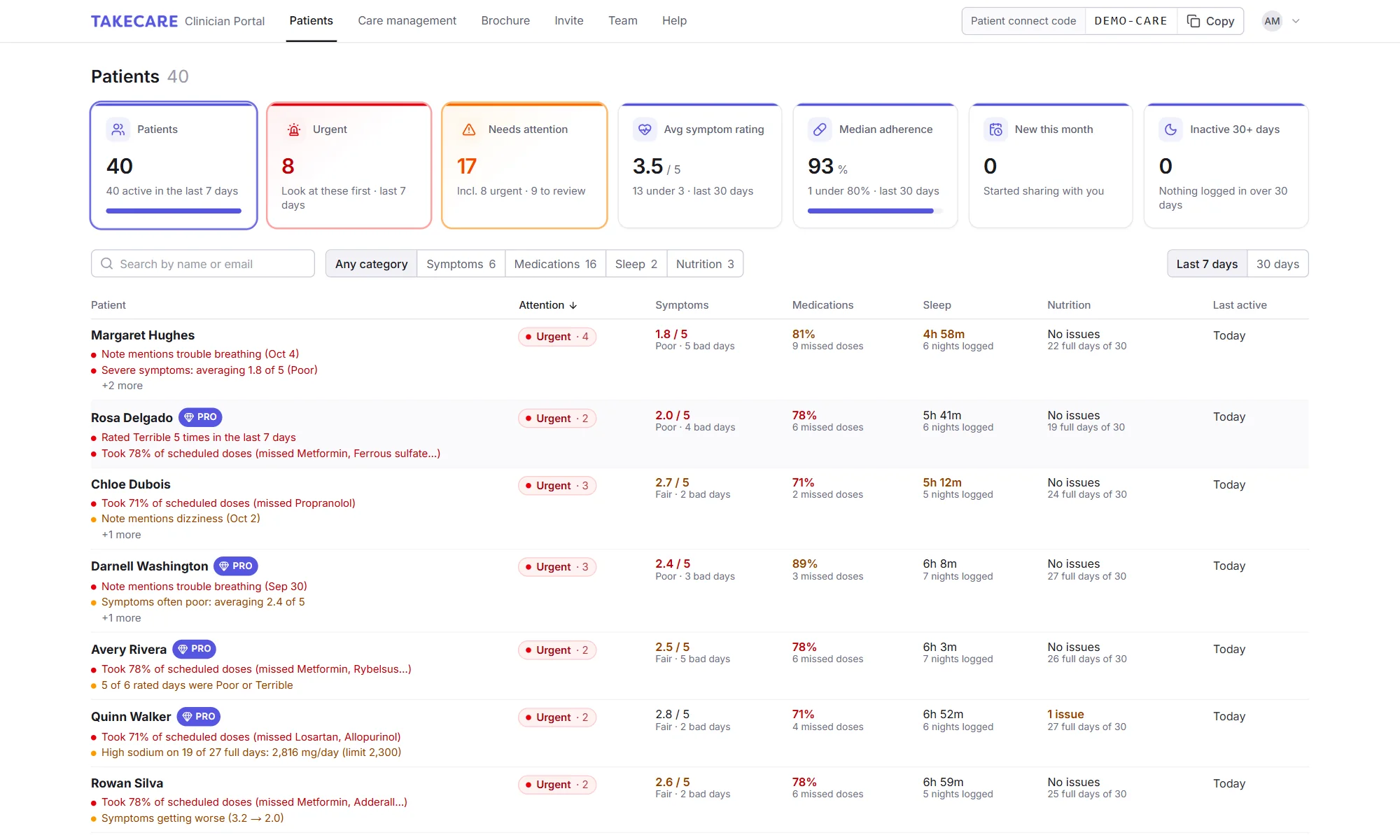
A deeper view of what may be affecting your patients
Open a patient’s record and run a Clinical Deep Dive. TakeCare’s AI reads every day the patient has shared over the last 30 days, finds the connections you wouldn’t have time to piece together from charts, and writes you a review: the overall picture, the problems it found and what’s worth asking about.
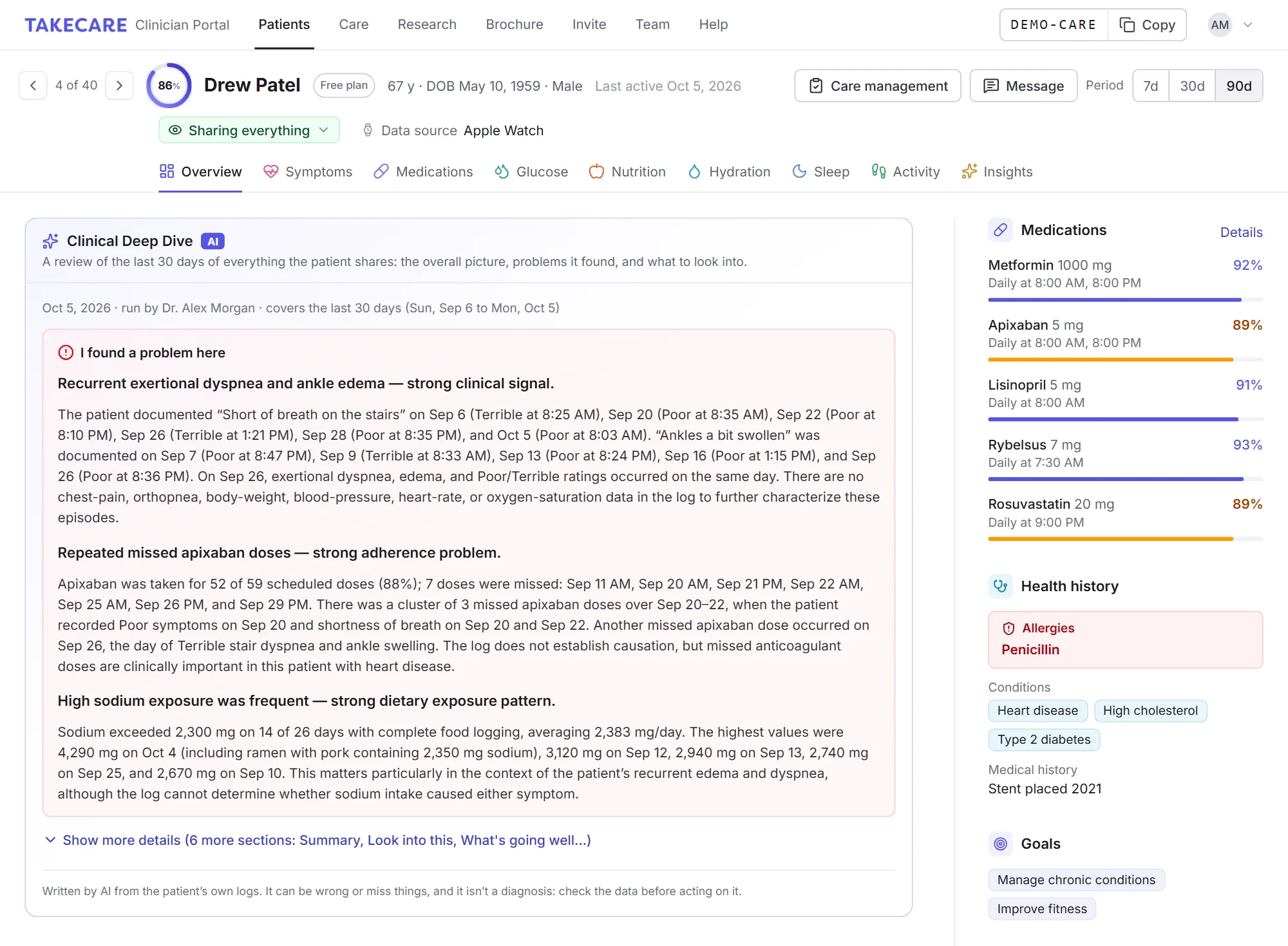
It reads every day
Every symptom rating and note, every meal and drink with its nutrients, each dose taken or missed, sleep and naps, steps, workouts and blood glucose. Only what the patient shares with your practice, without their name.
It connects the dots
It compares symptoms with what came before them, including delayed reactions 2 to 48 hours later and effects that build up over several days, and checks how things changed across the month.
It writes to you
A plain-language review written for a clinician, most clinically important first, with the dates and numbers behind every finding so you can check them in seconds.
What it looks for
The things that are easy to miss between visits, and hard to see scrolling through charts.
Foods and nutrients behind symptoms
Sodium, sugar, caffeine, alcohol, saturated fat and fiber, meal timing, skipped meals and fluids, and the symptoms that follow them.
Medication problems
Missed, late or irregular doses, and symptoms that line up with them or with a medication change, such as possible side effects.
Sleep and what follows it
Short or late nights, broken sleep and naps, and how the next day goes.
Notes that need reading
Anything the patient wrote that sounds urgent, new or worsening goes to the top.
Combinations and gaps
A short night plus a missed dose, or what’s missing, like no breakfast or too few fluids.
Which way things are going
Whether symptoms, habits and adherence are improving, stable or getting worse across the month.
A pattern has to show up at least three times before it’s reported, and every finding says how strong it is (strong, moderate or possible) and cites the dates and numbers behind it.
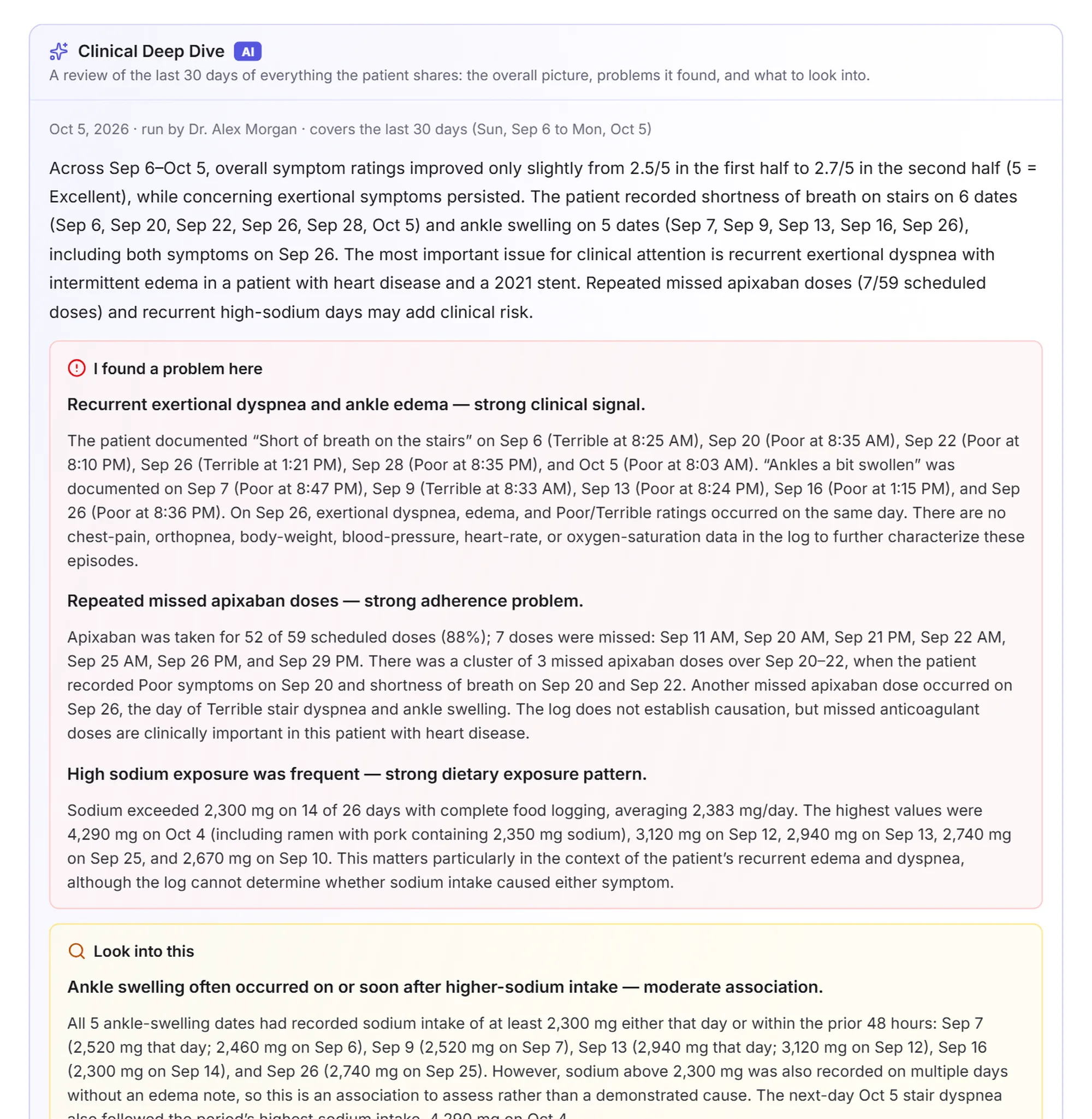
Problems first, with the evidence
The review opens on what most needs your attention, then the patterns worth checking, each with how strong it is.
- Summary: the overall picture, the direction things are going and the one thing most worth your attention
- I found a problem here: clear problems in the data, most important first, each with the evidence and why it matters clinically
- Look into this: possible links worth checking or asking about
Walk in with the right questions
The rest of the review turns the findings into a conversation you can have in the time you have.
- What’s going well: what to reinforce
- What the patient could do better: specific, practical changes to discuss
- Questions for the next visit: 3 to 6 questions to ask
- Data gaps: what’s missing or too sparse to judge, and what the patient could log to fill it in
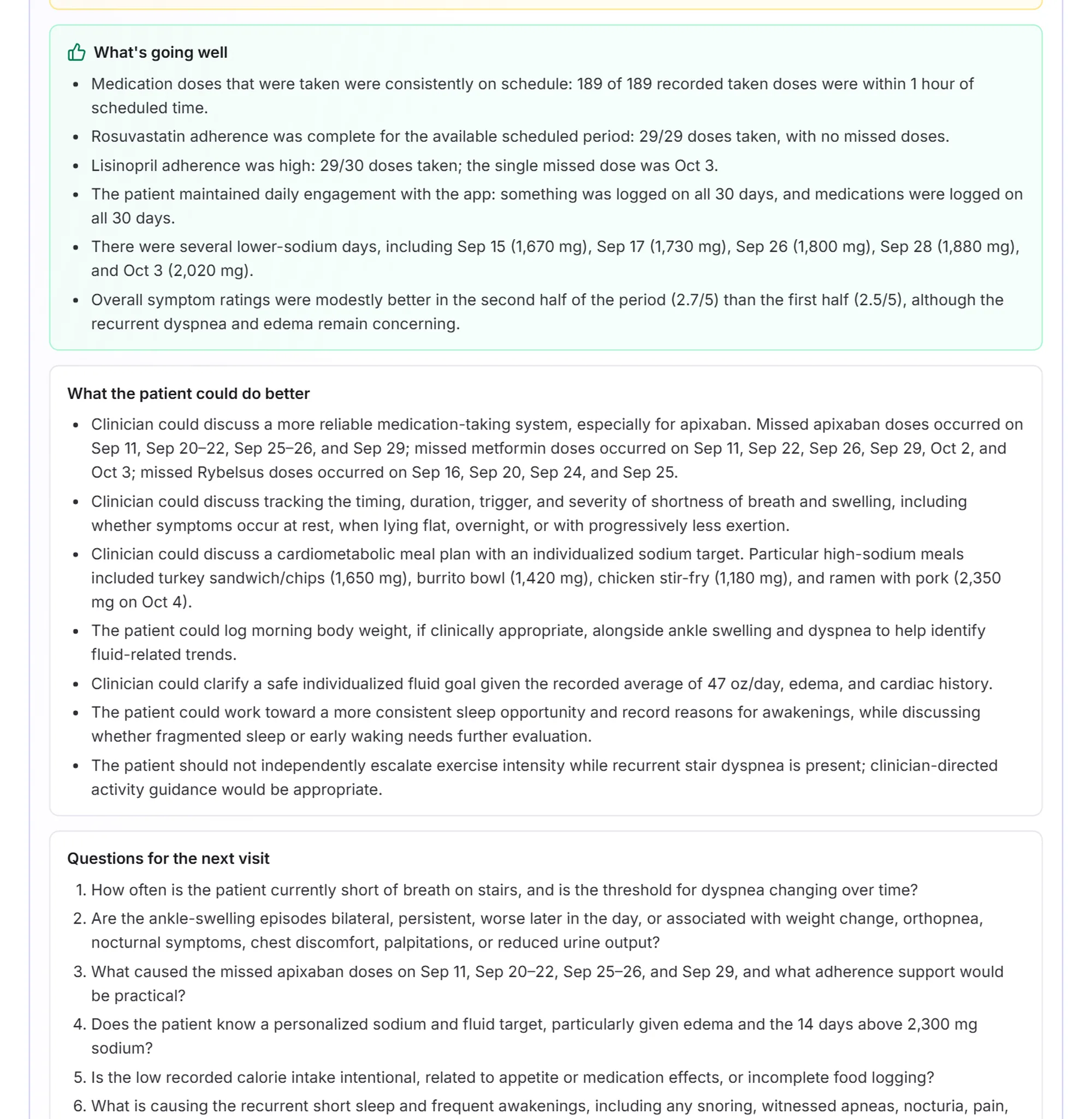
The review stays on the patient’s record for everyone in your practice, and you can look back at earlier ones. It’s written by AI from the patient’s own logs, so it can be wrong or miss things, and it isn’t a diagnosis: check the data behind a finding before acting on it.
You know the questions. The answers happen at home.
Ask any clinician: chronic conditions are some of the hardest problems in medicine to solve. Not because the questions are hard, but because the answers are hidden in the days between visits.
- Was it something they ate that set off the stomach pain?
- Is something they drink in the evening keeping them awake?
- What in their routine is behind the fatigue that won’t lift?
- Are they taking their medication on schedule, or only when they remember?
- Did the new prescription help, or did the flares settle on their own?
- Are the migraines tied to short nights, caffeine or skipped meals?
You ask. Your patient does their best to remember. But a month of good and bad days blurs into “some good days, some bad,” food diaries rarely last a week, and the pattern behind a flare-up or a run of sleepless nights stays out of sight. So you adjust the plan, wait for the next visit, and hope it was the right call.
TakeCare shows you what actually happened.
U.S. adults (76%) report at least one chronic condition.
More than half of adults live with two or more chronic conditions at once.
of the nation’s $5.3 trillion in annual health care spending is for people with chronic and mental health conditions.
Among young adults, the share with a chronic condition rose from 52.5% to 59.5% in ten years.
Sources: CDC, Preventing Chronic Disease, 2025 (2023 data, 2013–2023 trends); CDC, Health and Economic Costs of Chronic Conditions.
The days between visits, finally in view
For most of medicine, what happens at home has been a blind spot. TakeCare gives you the day-to-day record that never made it into the chart, logged by your patients as they live it.
Catch problems early
See a run of bad days, missed doses or short nights when it starts, not weeks later at the next visit.
Find the triggers together
Line up meals, sleep, activity and medication timing against symptoms to spot what really sets a patient off.
Make every visit count
Walk in already knowing how the last month went, and spend the time on decisions instead of questions.
Keep patients engaged
Knowing their care team can see their progress gives patients a reason to keep logging, and a short note between visits goes a long way.
Less digging. More time for care.
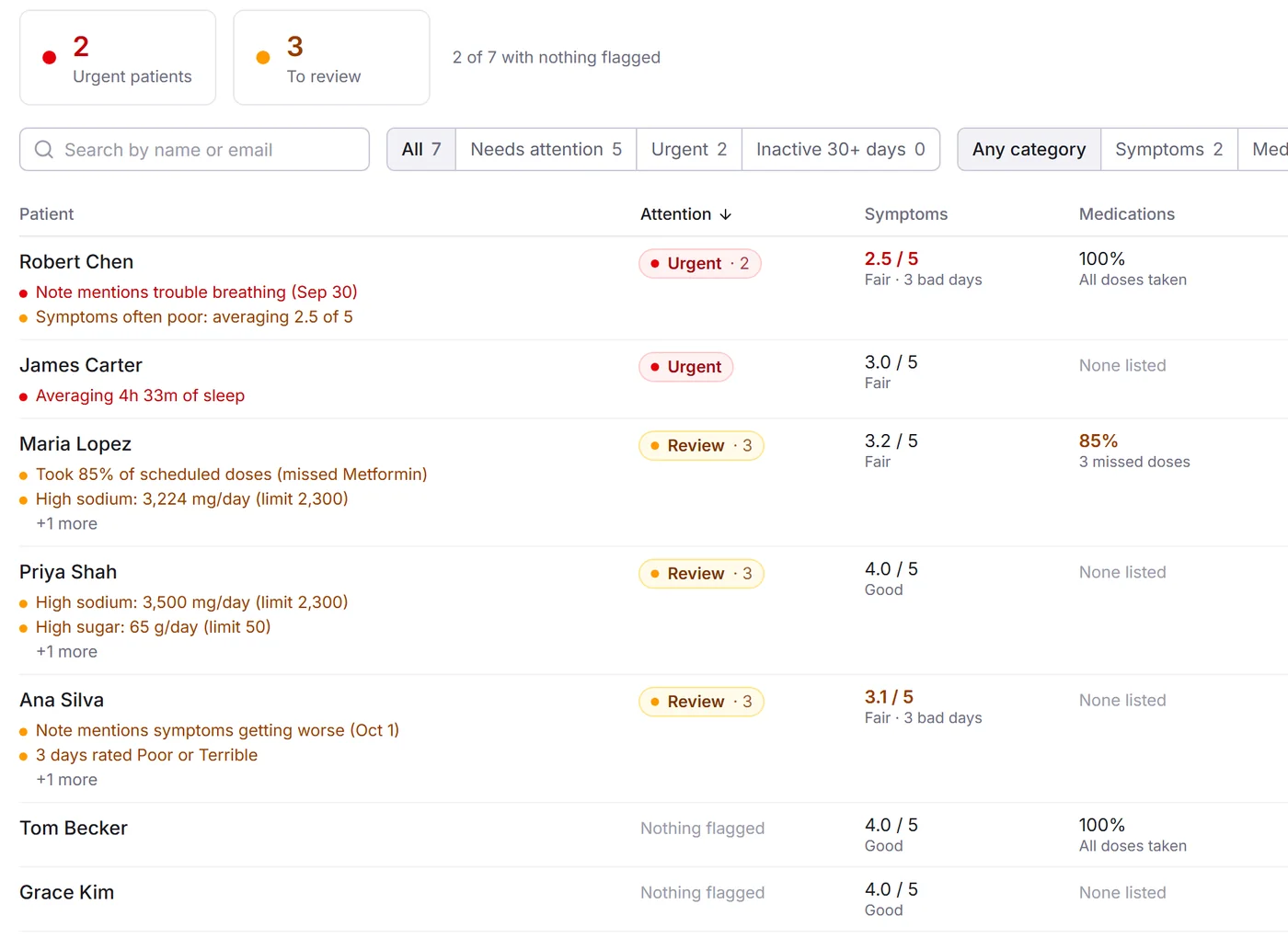
Everything a patient shares, organized the way you think about it: who needs attention, what changed, and why.
Know who needs you first
Don’t open every chart to find out who’s struggling. Your patient list flags the issues worth your time, worked out from each patient’s own logs.
- Urgent and review flags for symptoms, medications, sleep and nutrition, with the reason in plain words
- Sort and filter by any category to find, say, everyone sleeping under six hours
- Notes that need reading: entries mentioning things like chest pain or trouble breathing rise to the top
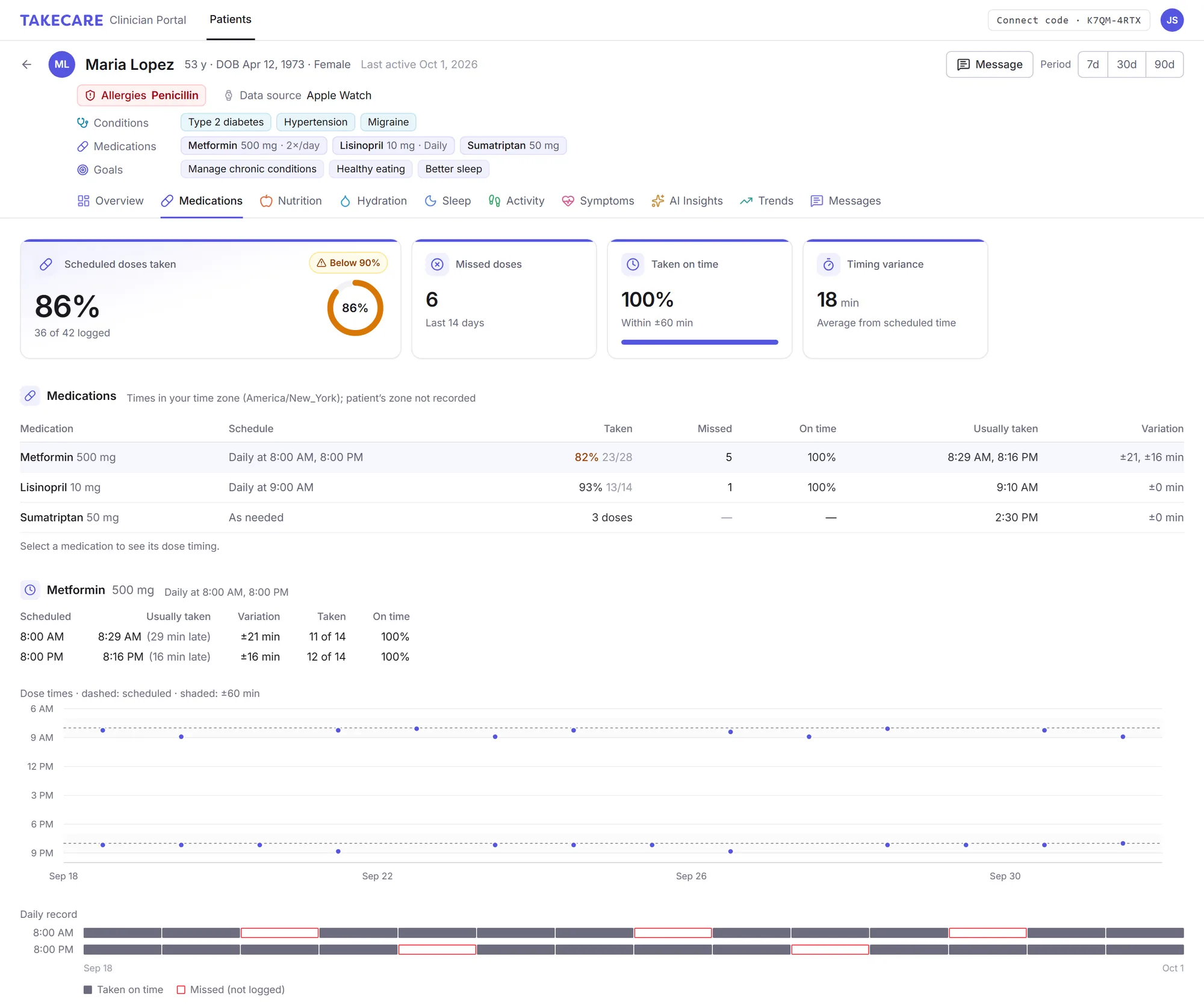
Adherence you can actually see
Scheduled doses, missed doses and when each dose was really taken, laid out day by day for every medication on the patient’s list.
- Adherence and timing per medication and per dose time, with the usual delay from schedule
- Allergies, conditions, medications and goals pinned to the top of every patient’s record
- How symptoms move after each dose: within 2 hours, 2–4 hours and beyond, compared with missed doses
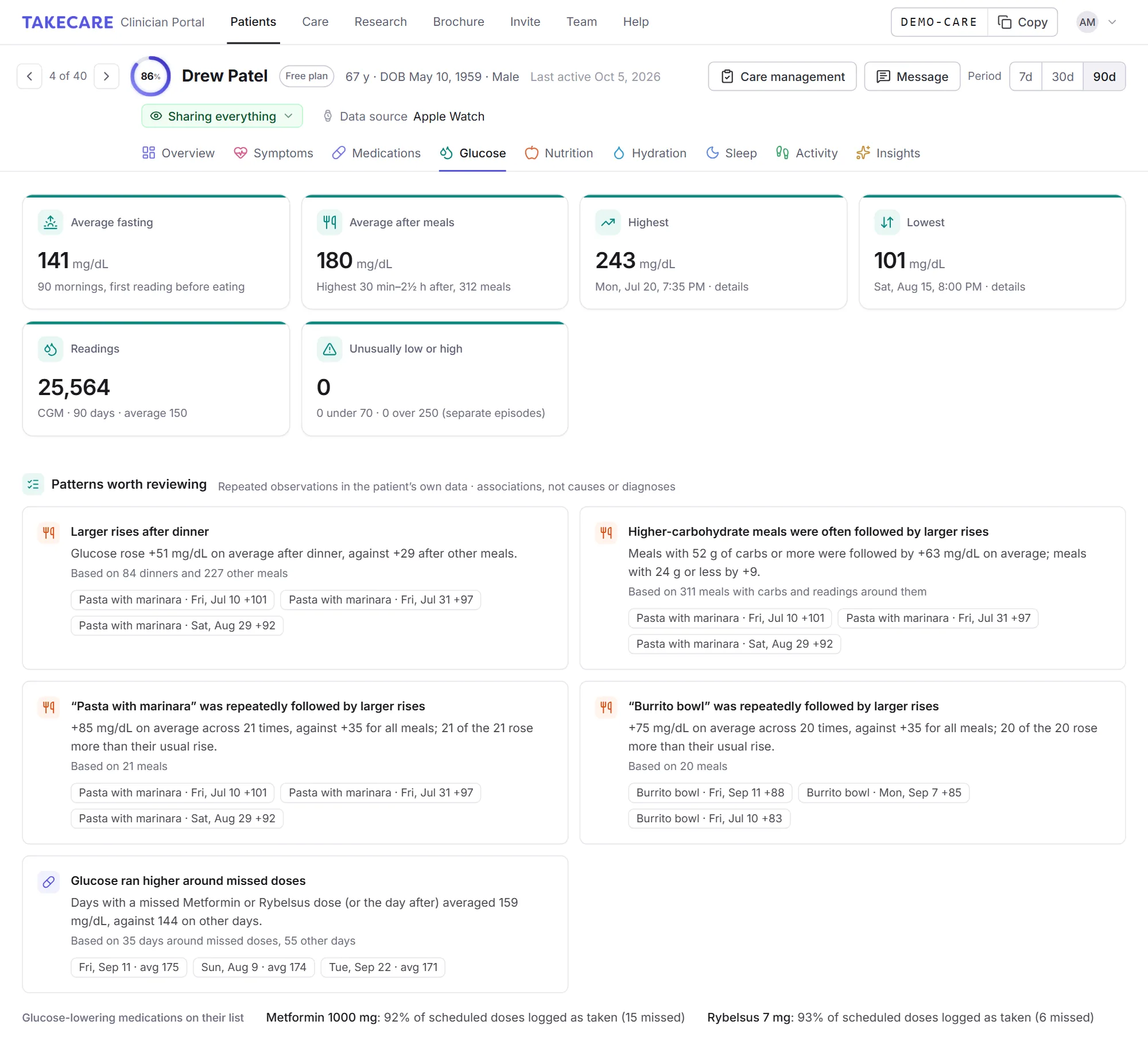
Glucose readings, with the day around them
Readings arrive from the patient’s meter or CGM through Apple Health or Health Connect, or they enter them by hand. The Glucose tab gives you the summary you want before a visit and the repeated patterns worth discussing.
- Average fasting and after-meal glucose, the highest and lowest readings, and how many were unusually low or high
- Time in range and variability once a CGM has recorded enough of each day, never worked out from occasional finger-sticks
- Patterns worth reviewing, like larger rises after dinner, after higher-carbohydrate meals or around missed doses, shown only once they repeat
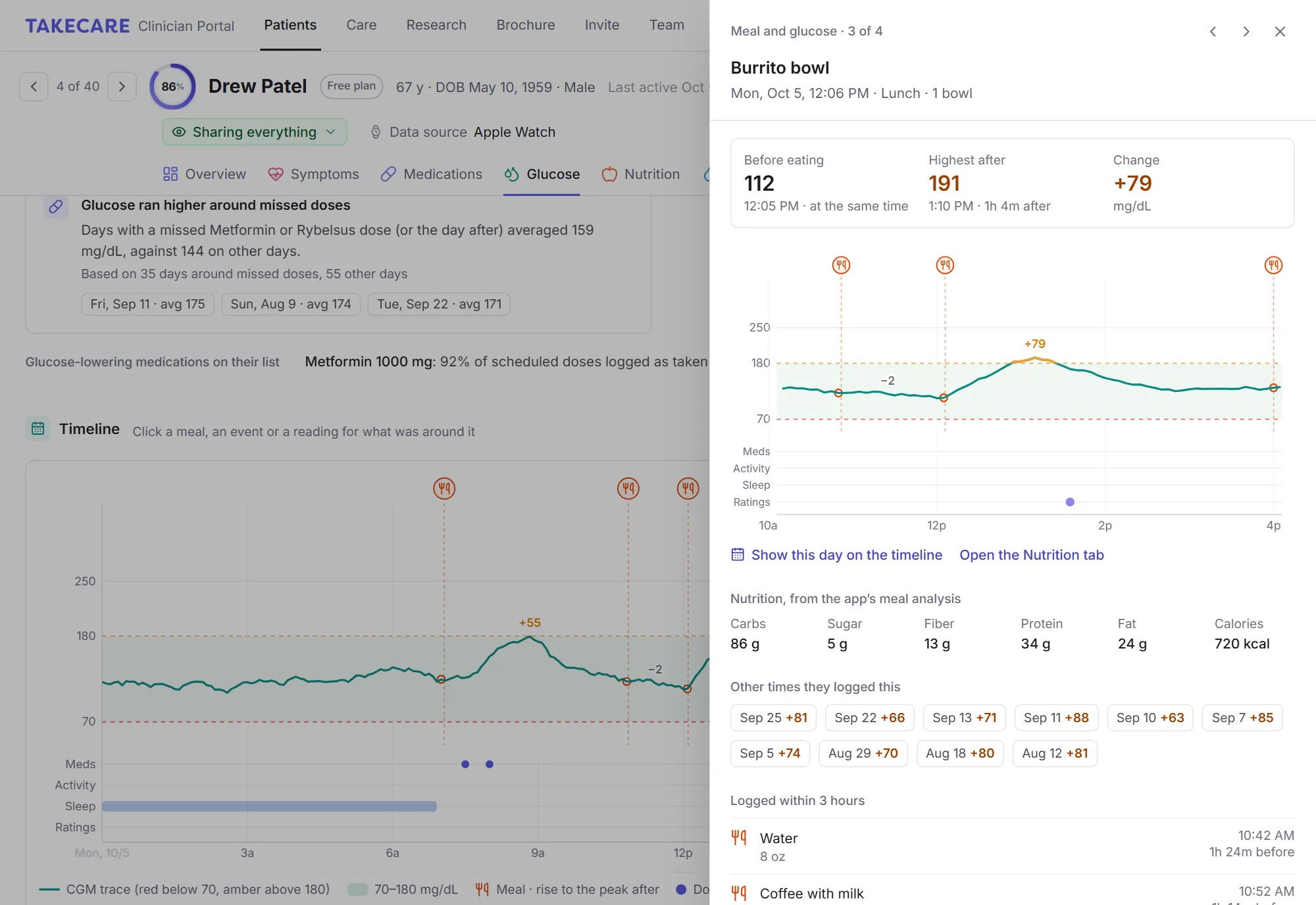
From a rise to the meal behind it
A timeline lines glucose up with meals, medication doses, workouts, sleep and symptom ratings. Click any meal to see glucose before and after it, the change, its carbohydrates and everything else logged nearby.
- A CGM as a continuous trace; finger-stick readings as separate points, never joined
- The average change after breakfast, lunch and dinner, by carbohydrate and by kind of meal, with the largest rises listed
- Associations, not conclusions: it shows what happened together, without judging control or suggesting treatment
Every meal, measured against what matters
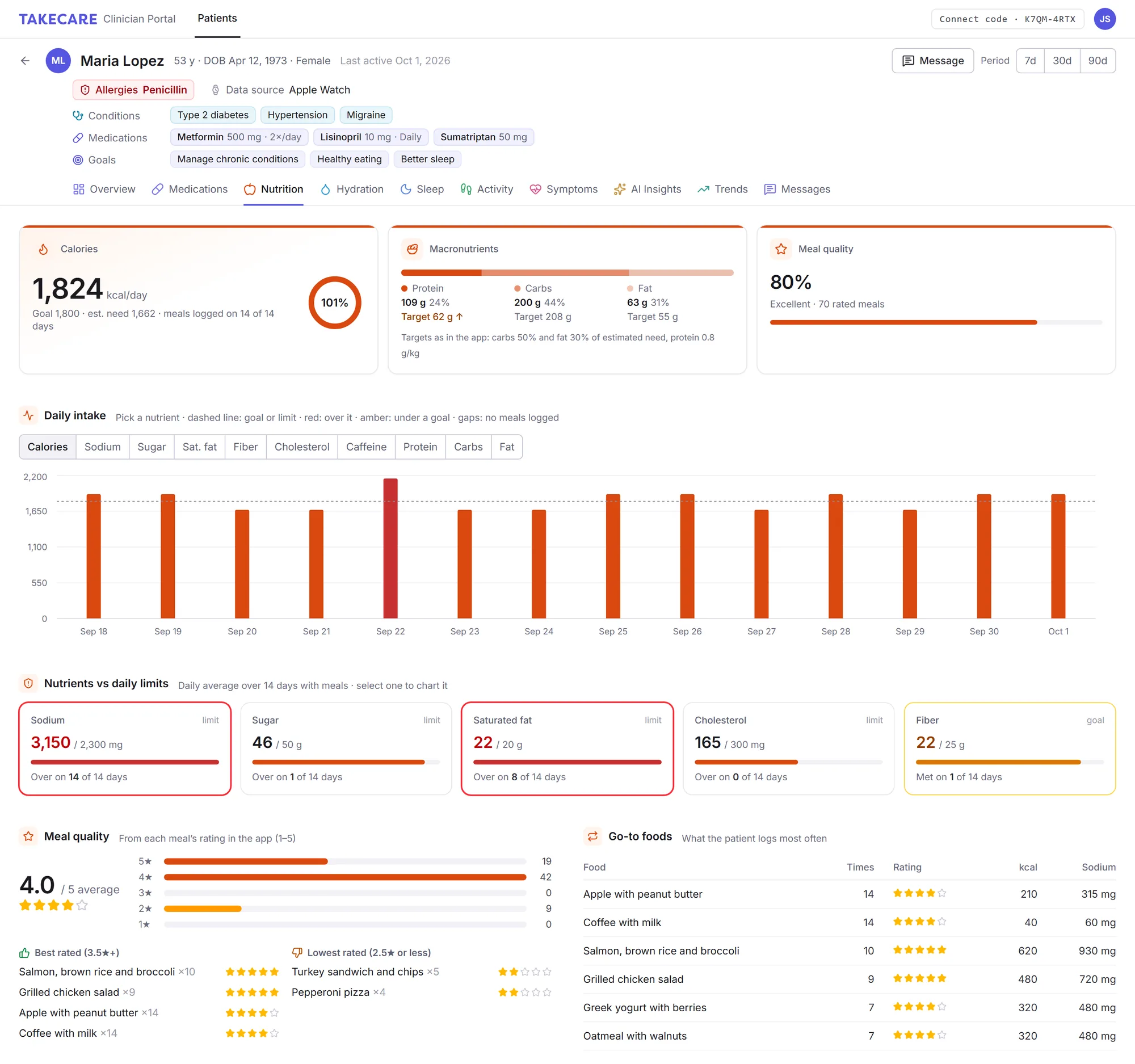
Meals are analyzed in the patient’s app as they log them. You see the averages, the outliers and the habits behind them.
- Daily intake against limits for sodium, sugar, saturated fat, cholesterol and fiber
- Macro targets from the patient’s profile, meal quality ratings and their go-to foods
- Hydration, caffeine and alcohol, with when they eat and drink through the day
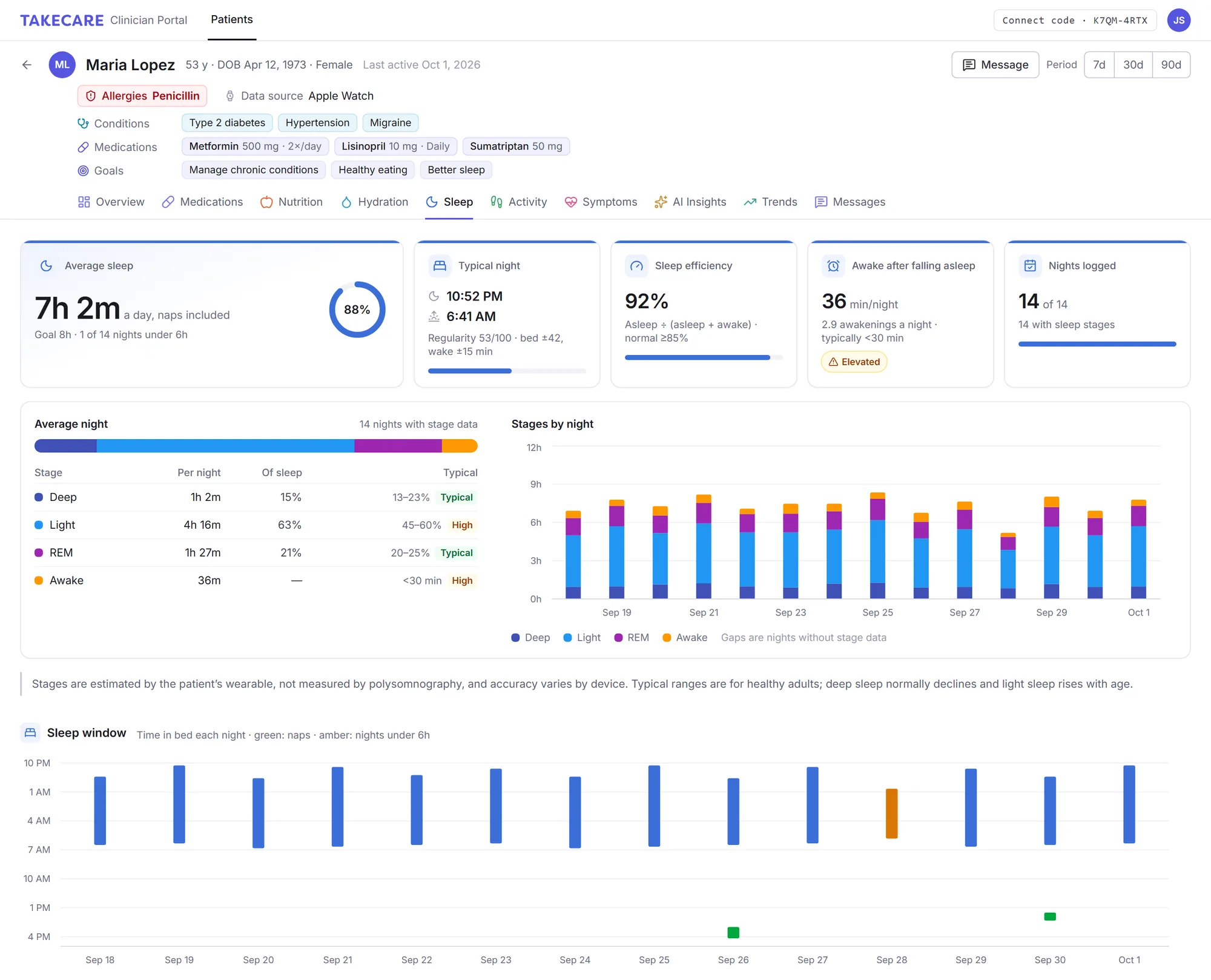
Real sleep data, not guesses
Nights sync from the patient’s Apple Watch or Android wearable, or they log them by hand. You can always tell which.
- Sleep stages and efficiency: deep, REM, light and time awake, night by night
- Bedtimes, wake times and naps on one chart, plus a running sleep debt
- Manual entries marked, so you know what came from a device
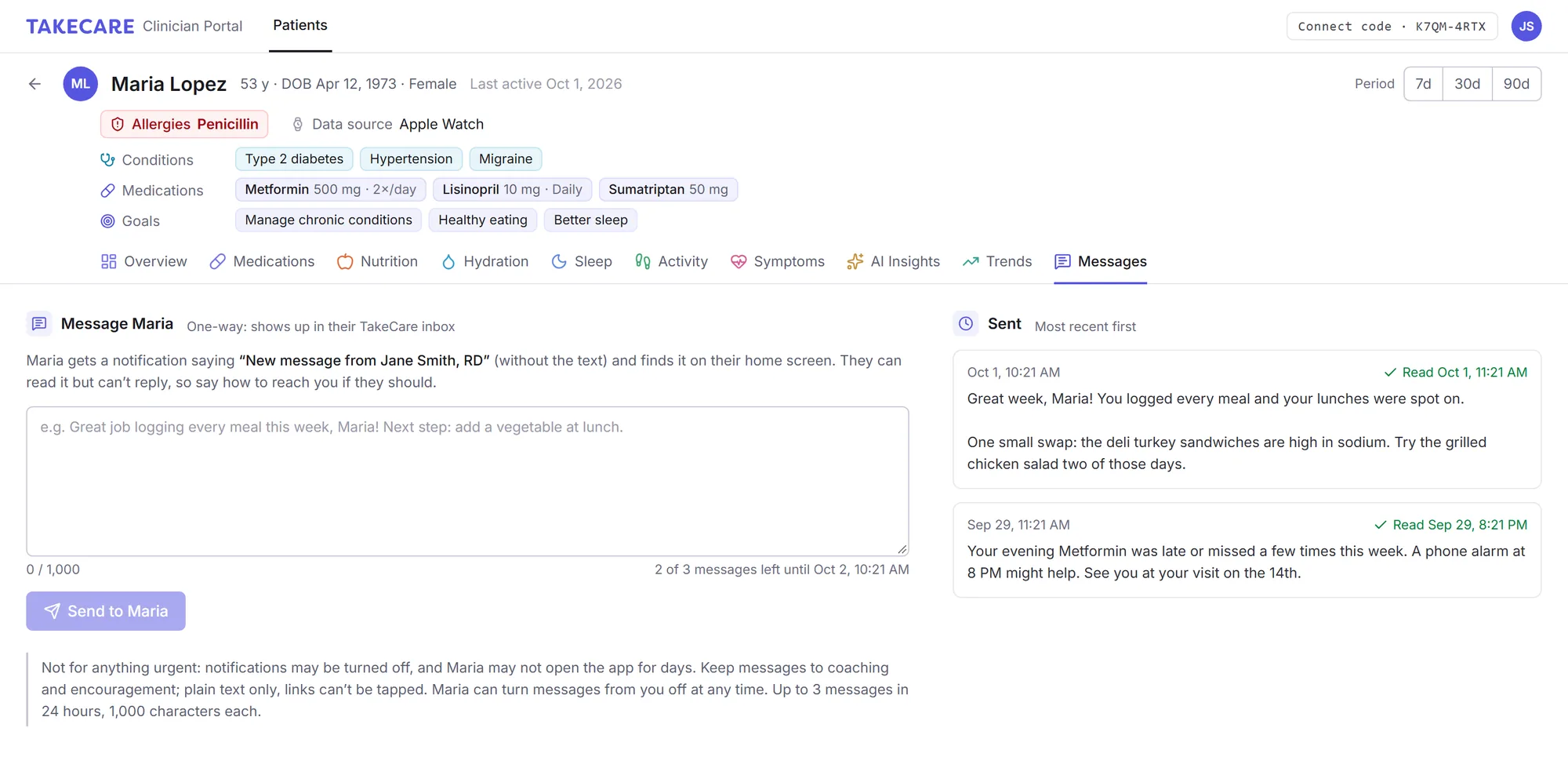
A quick note, right in their app
Send encouragement or a next step between visits. Patients get a notification and find it on their home screen.
- One-way and focused: short notes that land in their app, so it never becomes another inbox
- Read receipts, and you can unsend until it’s read
- Patients stay in control and can turn messages from you off at any time
The whole picture, one tab at a time
Switch between 7, 30 and 90 days. Each tab shows only what the patient chose to share.
Overview
A summary of the period, logging consistency, and an AI Deep Dive that points out what to look at first.
Symptoms
Symptom ratings through the day, good and hard days, and the notes patients write with them.
Hydration
Fluids against a weight-based goal, the drink mix, caffeine and alcohol in standard drinks.
Activity
Steps, workouts and active calories from their wearable, against their goals.
Glucose
Meter or CGM readings with meals, doses and symptoms around them, and the patterns worth discussing.
Insights
The AI reports patients receive, if they share them, plus what’s improving or slipping and how everything moves together.
Care management, driven by what patients report
When patients may be appropriate for programs such as Chronic Care Management (CCM), Principal Care Management (PCM), Advanced Primary Care Management (APCM) or Behavioral Health Integration (BHI), TakeCare helps your practice identify them, walk through each program’s requirements, manage enrolled patients month to month, and prepare the month’s documentation for your EHR.
- 1
Eligibility & enrollment
See which programs may fit and why, what’s met and what’s missing, then enroll.
- 2
Consent & documentation
Confirm the conditions TakeCare suggests from what the patient reports, and record consent.
- 3
Care plan
Draft a problem-oriented plan from the patient’s data. A clinician reviews and approves it.
- 4
This month’s care
Work the alerts and follow-ups, and log calls, reviews and time as they happen.
- 5
Finish the month
Copy a concise note into the patient’s chart, then mark the month for your billing review.
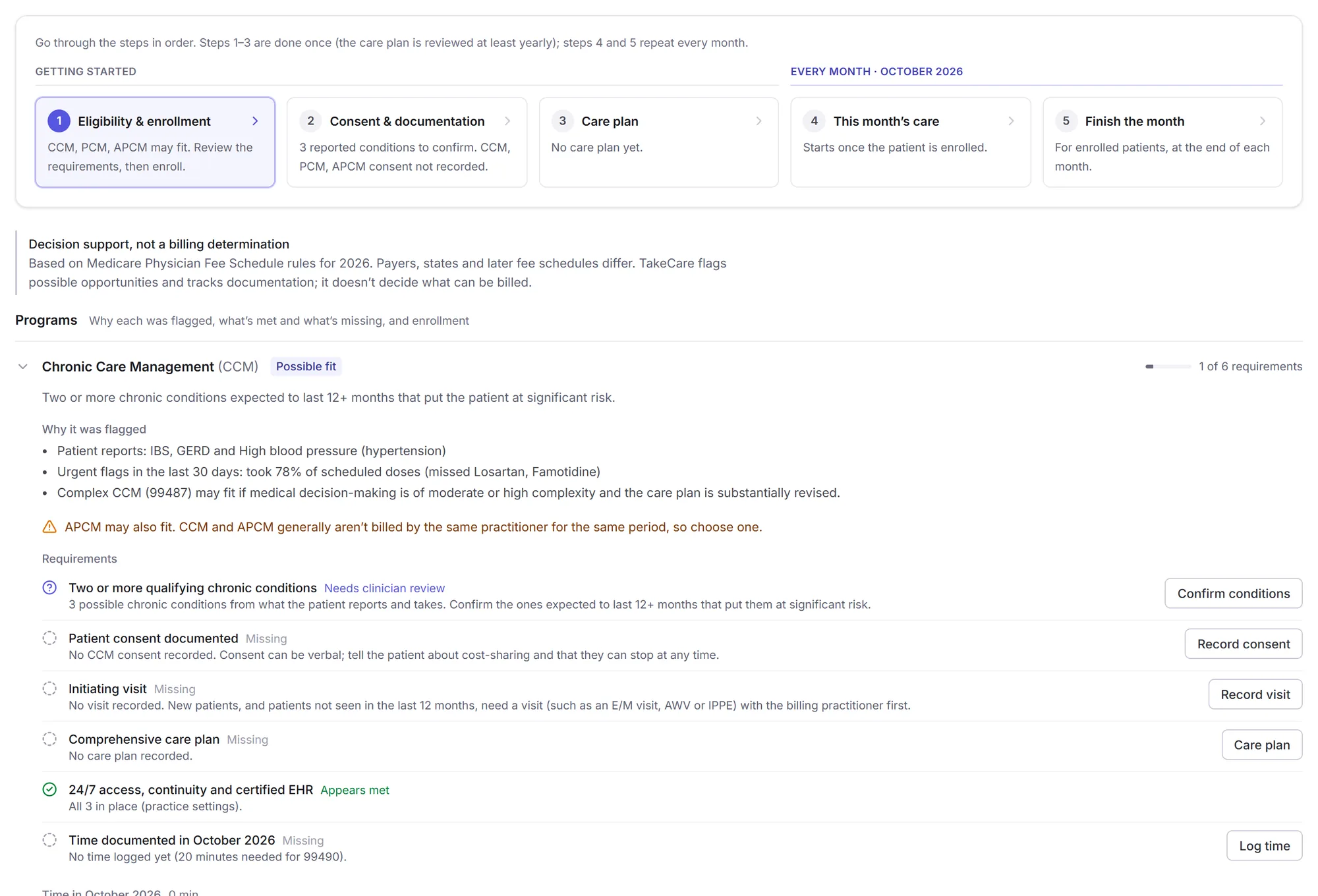
Find the patients who may benefit
TakeCare reviews what each patient shares and flags programs that may fit, with the reasons in plain words, so your team knows who is worth a closer look.
- Every requirement shown as met, missing or needing a clinician’s confirmation, with a button to take care of each
- Conditions filled in for you from what the patient reports, for a clinician to confirm
- Consent and enrollment recorded in the same place
Know which enrolled patients need attention
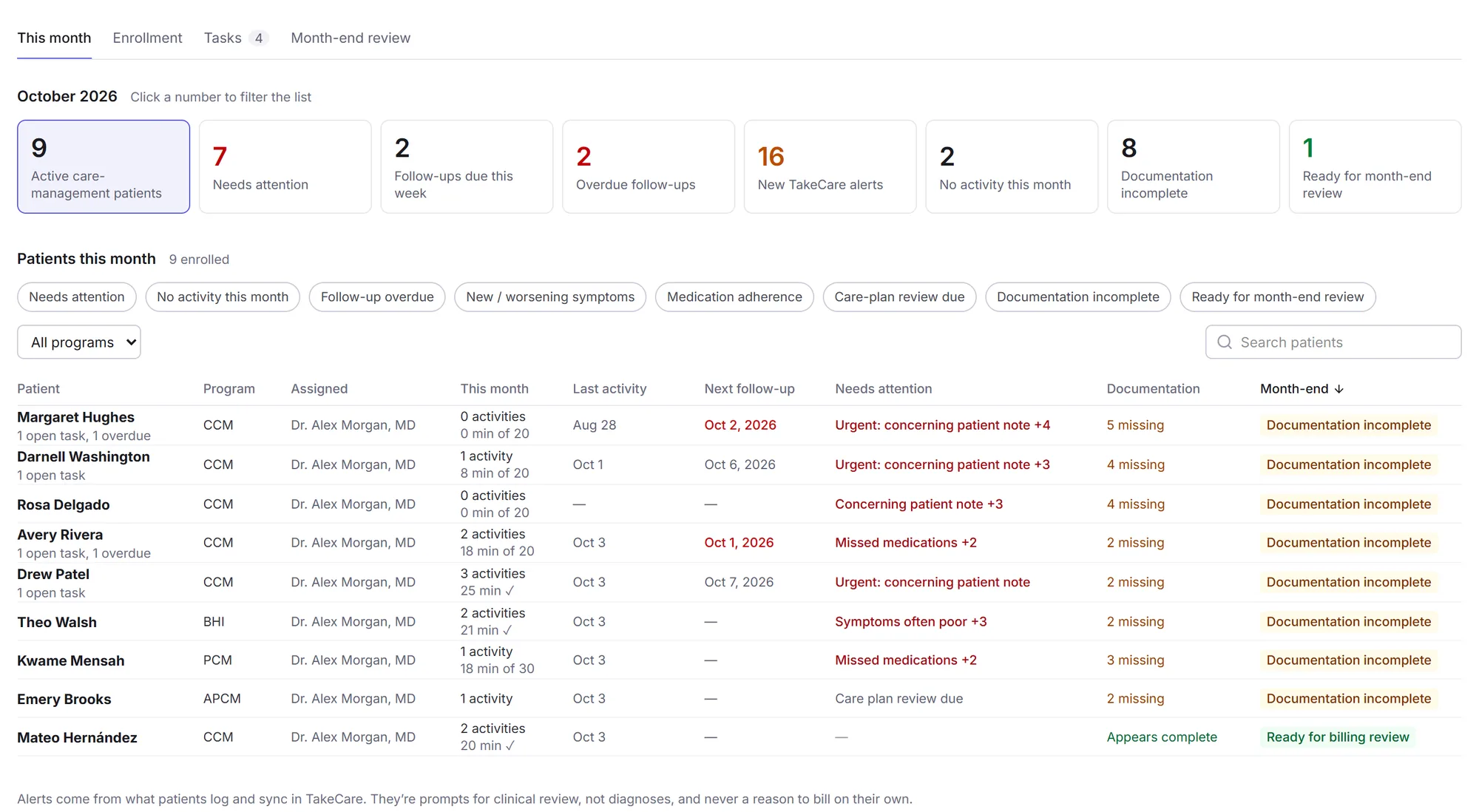
Instead of reviewing every patient, start with the ones whose data says something changed, and see what’s still due before the month ends.
- Alerts from patient data: worsening symptoms, missed doses, concerning notes
- Follow-ups assigned across your team, with overdue ones up front
- No activity yet and documentation incomplete, at a glance
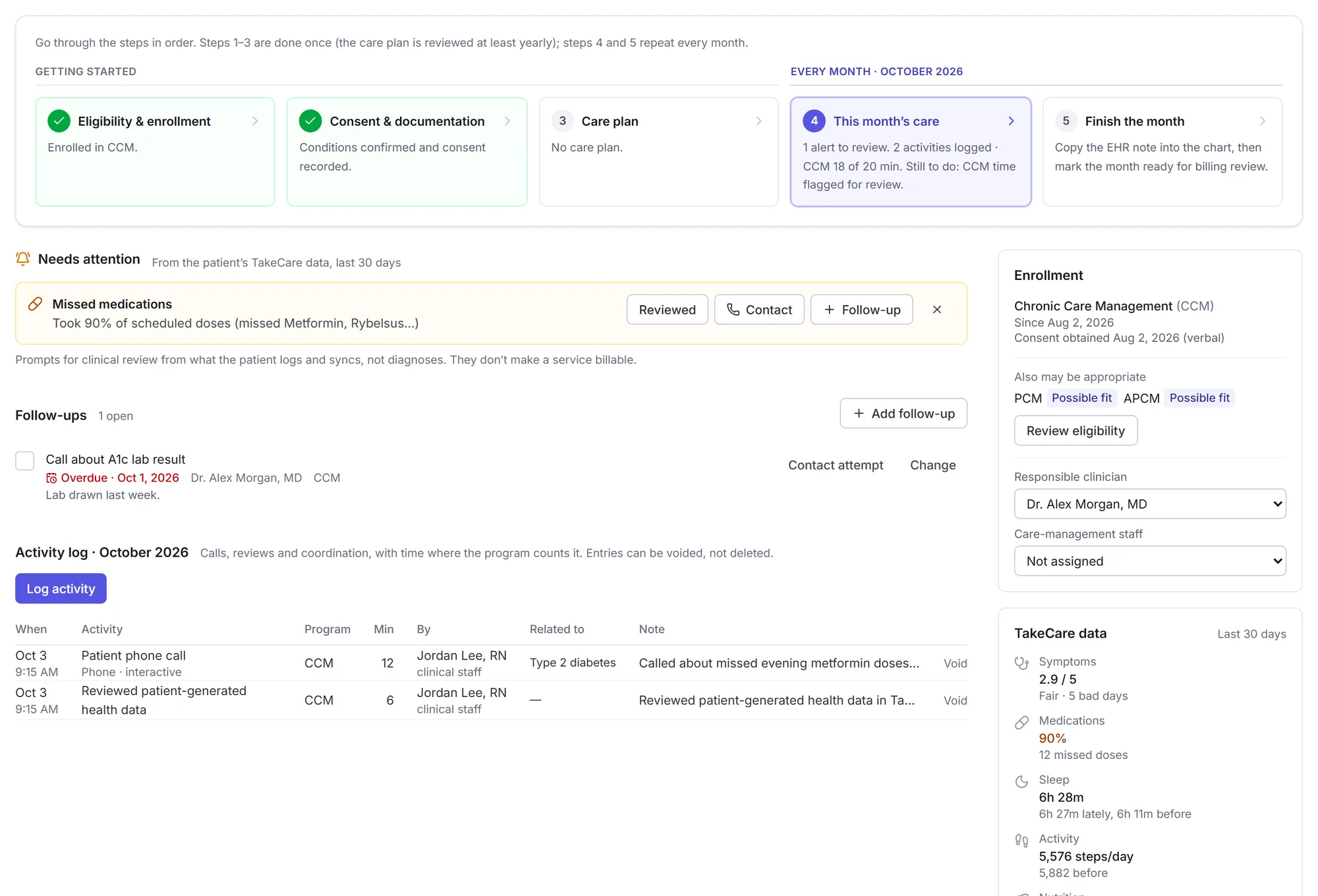
Record the work as it happens
Review an alert, call the patient, and log it in the same place, so the month’s record builds itself as your team works.
- An activity log of calls, data reviews and coordination, with time where the program counts it
- Notes prefilled from the patient’s data
- Care plans with every approved version kept
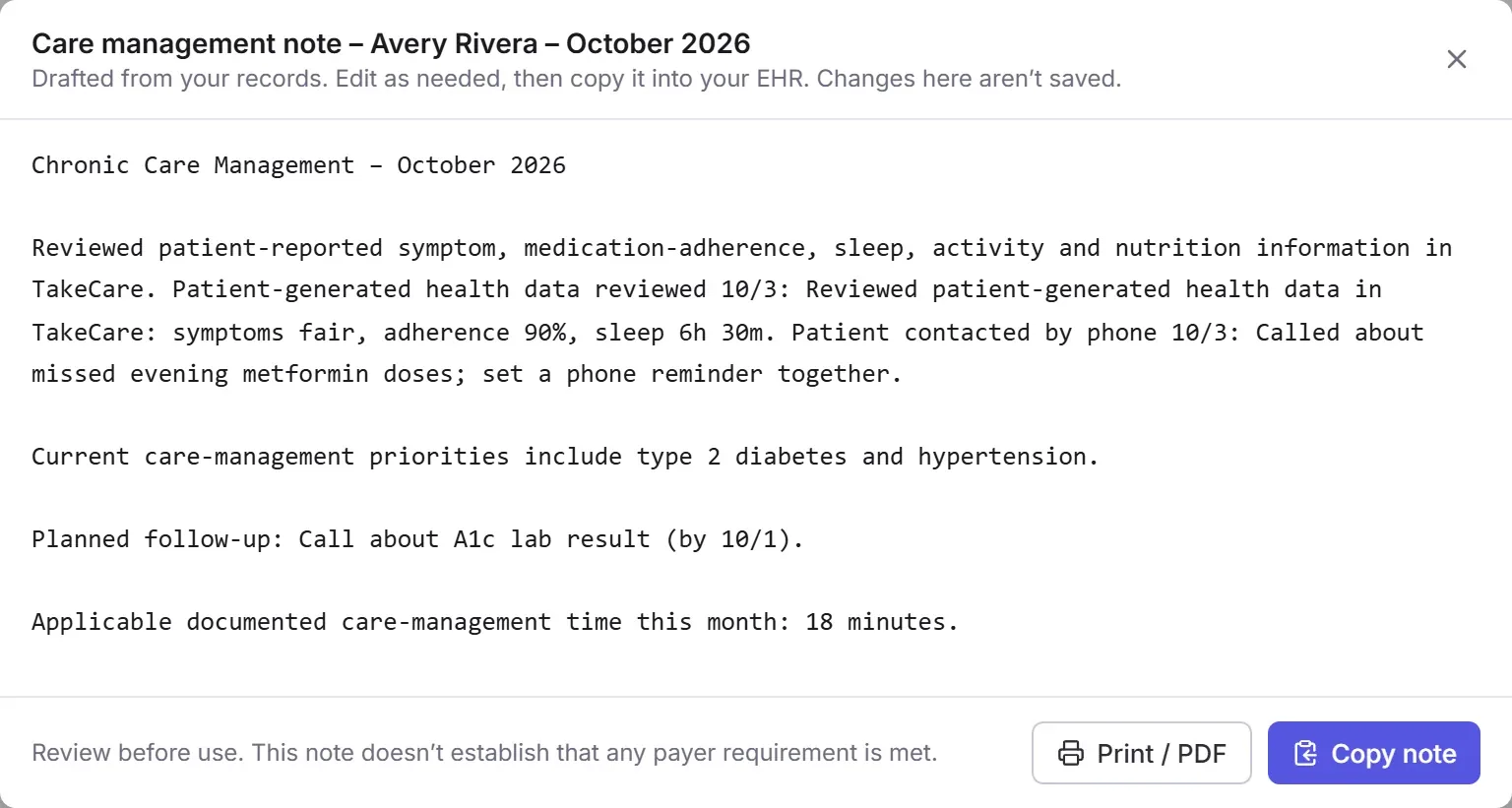
A note for your EHR, ready to paste
At the end of the month, TakeCare drafts a concise note from what your team logged. Review it, paste it into the patient’s chart, and mark the month for your billing review.
- Works alongside your EHR, with nothing to install or integrate
- A printable monthly report for each patient
- Month-end review across the practice, with what’s documented and what’s missing
Decision support, not a billing determination. TakeCare flags possible opportunities and organizes the work and documentation; your practice makes every clinical, eligibility, coding and billing decision. TakeCare doesn’t submit claims, and it isn’t a remote patient monitoring device.
Built for the chronic conditions you treat every day
Whatever your patients live with, the questions are the same: what’s helping, what’s making it worse, and are they taking care of themselves between visits? Clinicians use TakeCare to follow patients with:
Diabetes & metabolic health
- Type 2 diabetes
- Prediabetes
- Type 1 diabetes
- Obesity
- Metabolic syndrome
What you see: carbohydrates, sugar and calories meal by meal, eating times, activity, sleep and medication adherence.
Heart & blood pressure
- Hypertension
- High cholesterol
- Heart disease
- Heart failure
- Atrial fibrillation (AFib)
What you see: sodium and saturated fat against daily limits, alcohol and caffeine, activity, and dose-by-dose adherence for medicines like blood thinners.
Digestive conditions
- Irritable bowel syndrome (IBS)
- Crohn’s disease
- Ulcerative colitis
- GERD & acid reflux
- Celiac disease
- Food intolerances
- Gastroparesis
What you see: what they ate before their worse days, meal timing and late eating, and symptom ratings with their notes.
Pain, joints & autoimmune
- Fibromyalgia
- Rheumatoid arthritis
- Osteoarthritis
- Lupus
- Psoriatic arthritis
- Chronic back pain
- Multiple sclerosis
What you see: symptoms through the day, how they respond to as-needed pain medication, and how sleep and activity line up with flares.
Migraine, fatigue & sleep
- Migraine
- Chronic fatigue syndrome (ME/CFS)
- Long COVID
- POTS
- Insomnia
What you see: sleep stages and naps, caffeine and alcohol, hydration, and the meals and nights before their worst days.
Mental health
- Depression
- Anxiety
- ADHD
What you see: sleep and activity patterns, symptom ratings and notes, and medication timing. Notes that mention thoughts of self-harm are flagged at the top of your patient list.
Hormones & thyroid
- Hypothyroidism
- Hashimoto’s thyroiditis
- PCOS
- Endometriosis
- Menopause symptoms
What you see: medication timing, energy and symptom ratings through the day, sleep, and nutrition against their goals.
Kidney & gout
- Chronic kidney disease
- Gout
- Kidney stones
What you see: sodium and fluid intake, alcohol, medication adherence, and the foods and drinks logged before flares.
Lungs & breathing
- Asthma
- COPD
- Sleep apnea
What you see: symptoms and notes, activity, sleep stages and awakenings, and adherence to controller medicines.
TakeCare doesn’t diagnose or treat any condition. It shows you what your patients log and sync, so you can make better-informed decisions with them.
Connected in a few minutes
No integration, no IT ticket. You work in your browser; your patients use the TakeCare app on iPhone or Android.
Create your account
Sign up with your work email, start your practice’s monthly subscription, and turn on two-step verification. Then add up to 19 colleagues.
Share your connect code
You get a personal code to give your patients in person, by email or on a handout.
K7QM-4RTXPatients choose what to share
They enter your code in the app, pick the categories you can see, and their data appears in your portal.
Patients stay in control
Sharing is always the patient’s choice, and every account that can see it is protected.
They choose every category
Patients decide exactly what each clinician can see (meals, medications, sleep, activity, symptoms and more) and can change it any time.
They can stop sharing instantly
From the app, they can end your access at any time. Nothing is shared with anyone they haven’t connected to themselves.
Two-step verification required
Every clinician signs in with a password and an authenticator app code. A stolen password alone can’t open a patient’s data.
TakeCare is a wellness tool, not a medical device. Patterns in the portal are associations from self-logged and wearable data, not diagnoses; use your clinical judgment.
One price for your whole practice.
Every feature, no per-patient fees, and your patients never pay to share their data with you.
$99.99 per month
- Up to 20 clinicians and staff, each with their own login
- Unlimited patients
- Care management: eligibility, consent, care plans, activity and time, EHR notes and month-end review
- Every tab: medications, nutrition, hydration, sleep, activity, symptoms, trends and AI insights
- Patient triage and one-way messages
Payment is processed securely by RevenueCat and Stripe after you create your account. Cancel anytime; you keep access until the end of the month you’ve paid for. See our refund policy.
Questions clinicians ask
Which chronic conditions is TakeCare useful for?
Any condition where daily habits and symptoms matter between visits. Clinicians use it for type 2 diabetes and prediabetes, hypertension and high cholesterol, heart disease, IBS, Crohn’s disease and ulcerative colitis, GERD, celiac disease, migraine, fibromyalgia, rheumatoid arthritis and other autoimmune conditions, chronic fatigue and long COVID, chronic kidney disease and gout, thyroid conditions, obesity, PCOS, asthma and COPD, and mental health conditions such as depression and anxiety.
How is this different from a food diary or a fitness tracker?
A food diary or tracker shows one piece, usually only to the patient. TakeCare brings meals, medications, symptoms, sleep and activity together in one place, lines them up against each other, and shows them to you, so you can see how one affects another.
Who is the portal for?
Anyone who supports patients between visits: registered dietitians and nutritionists, health and wellness coaches, physicians, nurse practitioners, physician assistants, pharmacists, therapists and physical therapists.
Do my patients need to pay or have TakeCare Pro?
No. The TakeCare app is free to download, and sharing with a clinician is free. Some app features (like meal photo analysis) are part of TakeCare Pro, but patients don’t need it to share with you.
What will I see for each patient?
Only the categories the patient chooses: profile and goals, conditions and allergies, medications and the doses they log, meals and nutrition, sleep, activity, symptoms, blood glucose, and the AI reports they receive in the app.
Where does the data come from?
From what patients log in the app (meals, medication doses, symptom ratings and notes) and from their phone or wearable through Apple Health or Health Connect (sleep, steps and workouts, and blood glucose from a meter or CGM). The portal shows which device a patient’s data comes from.
Can I message my patients?
Yes, with short one-way messages (up to 1,000 characters). Patients get a notification and read the message in the app; they can’t reply in TakeCare, so include how to reach you. They can turn messages off at any time.
Is it a subscription?
Yes. It’s $99.99 a month for your practice, covering up to 20 clinicians and staff, with unlimited patients and no per-patient fees. Cancel anytime.
Does it help with CCM or other care management?
Yes. TakeCare helps your practice find patients who may be appropriate for programs such as CCM, PCM, APCM and BHI, walk through each program’s requirements, record consent, keep the care plan, log the month’s work and time, and prepare a concise note for your EHR. Your practice makes every clinical, eligibility, coding and billing decision.
Does TakeCare bill or submit claims?
No. TakeCare organizes the care-management work and documentation for your own billing review. Your practice decides what’s appropriate to bill and submits claims through its existing process.
Does it replace my EHR?
No. It’s a window into how patients are doing at home between visits, and its care-management notes are made to copy into your EHR. Use it alongside your existing records and clinical judgment.
Your patients live with their conditions every day. Now you can see it.
Set up your account in a few minutes and share your code with your first patient today.