
See how your clients are doing between sessions.
Your clients make their progress in the days between your sessions: what they eat, how much they move and how well they sleep. TakeCare shows you those days, logged in the free TakeCare app, synced from their watch and shared with you by your clients.
New Lifestyle Deep Dive: an AI review of every client’s month →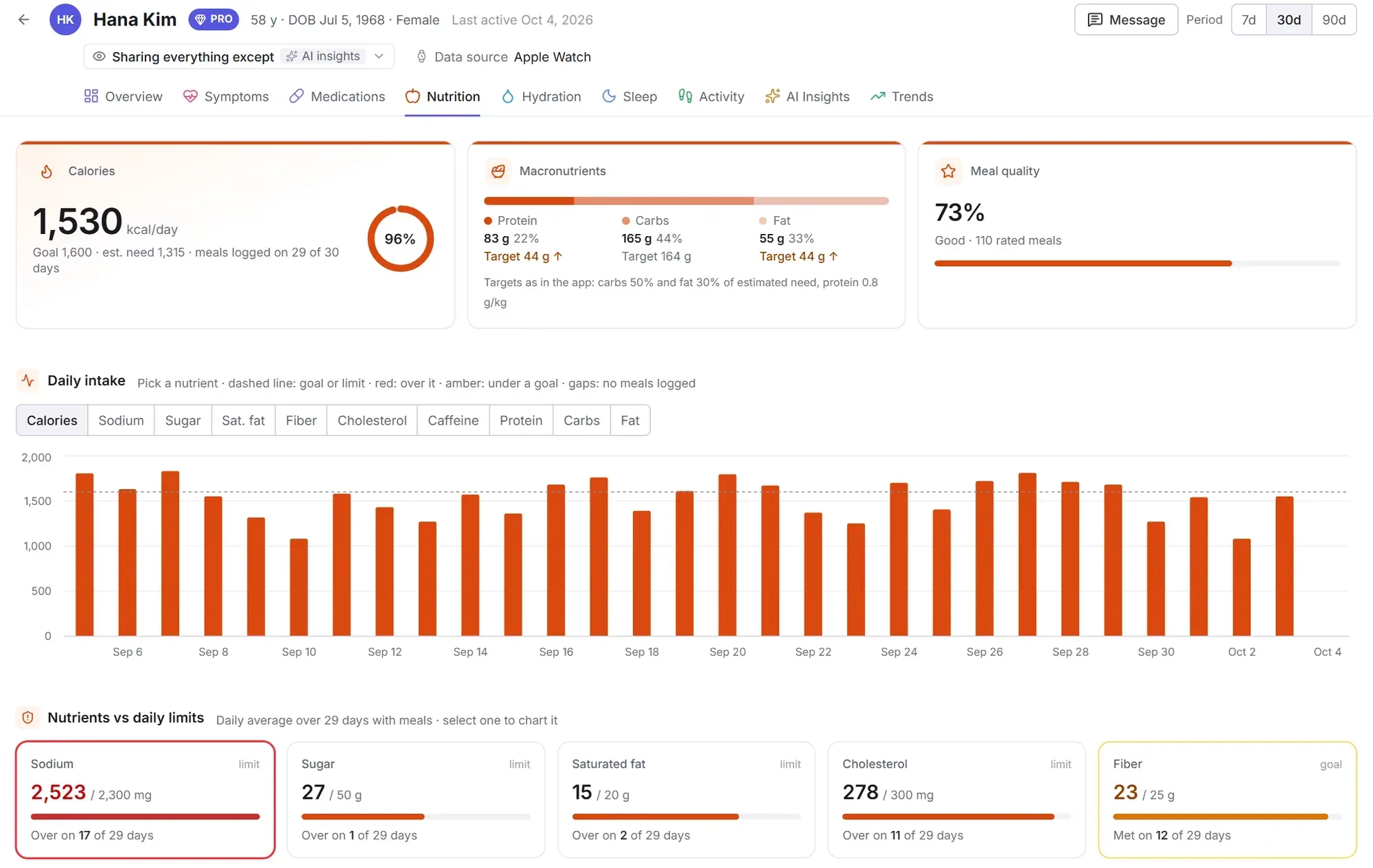
A month of your client’s habits, read for you
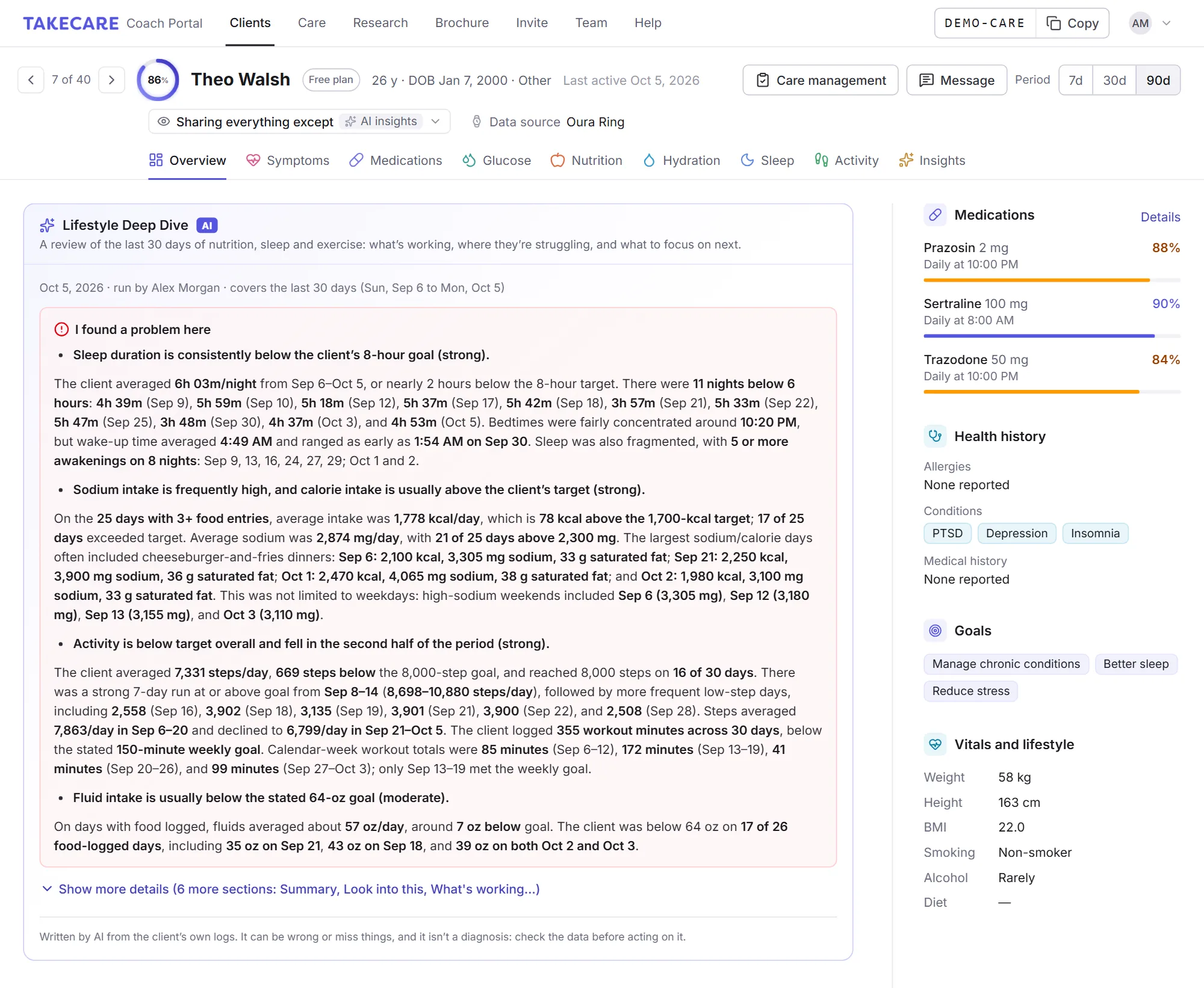
Open a client’s record and run a Lifestyle Deep Dive. TakeCare’s AI reads every day of nutrition, sleep and exercise your client has shared over the last 30 days, finds the patterns behind their progress, and writes you a review: what’s working, where they’re struggling and what to focus on next.
It reads every day
Every meal and drink with its nutrients, sleep and naps, steps and workouts, and the ratings and notes your client logs about how they feel. Only what they share with you, without their name.
It connects the dots
It looks at how habits affect each other, like a short night followed by high-sugar snacks or more steps on days with breakfast, and how things changed across the month.
It writes to you
A plain-language review written for a coach, with the dates and numbers behind every finding, ready to bring into your next session.
What it looks for
The habits behind your client’s progress, and the ones getting in the way.
Eating patterns
Meal timing, skipped meals, late-night eating and weekday versus weekend differences.
Nutrients and goals
Protein, fiber, sugar, sodium, saturated fat, caffeine, alcohol and fluids, and how close they are to their goals.
Sleep and what follows it
How long and how regular, bedtimes, wake-ups and naps, and what follows short or late nights.
Activity
Steps and workouts, active days versus rest days, streaks and drop-offs.
How habits connect
Where sleep, food, movement and how they feel line up, so you can see what drives what.
Which way things are going
Improving, stable or slipping across the month, and whether gaps in logging hide anything.
A pattern has to show up at least three times before it’s reported, and every finding says how strong it is (strong, moderate or possible) and cites the dates and numbers behind it.
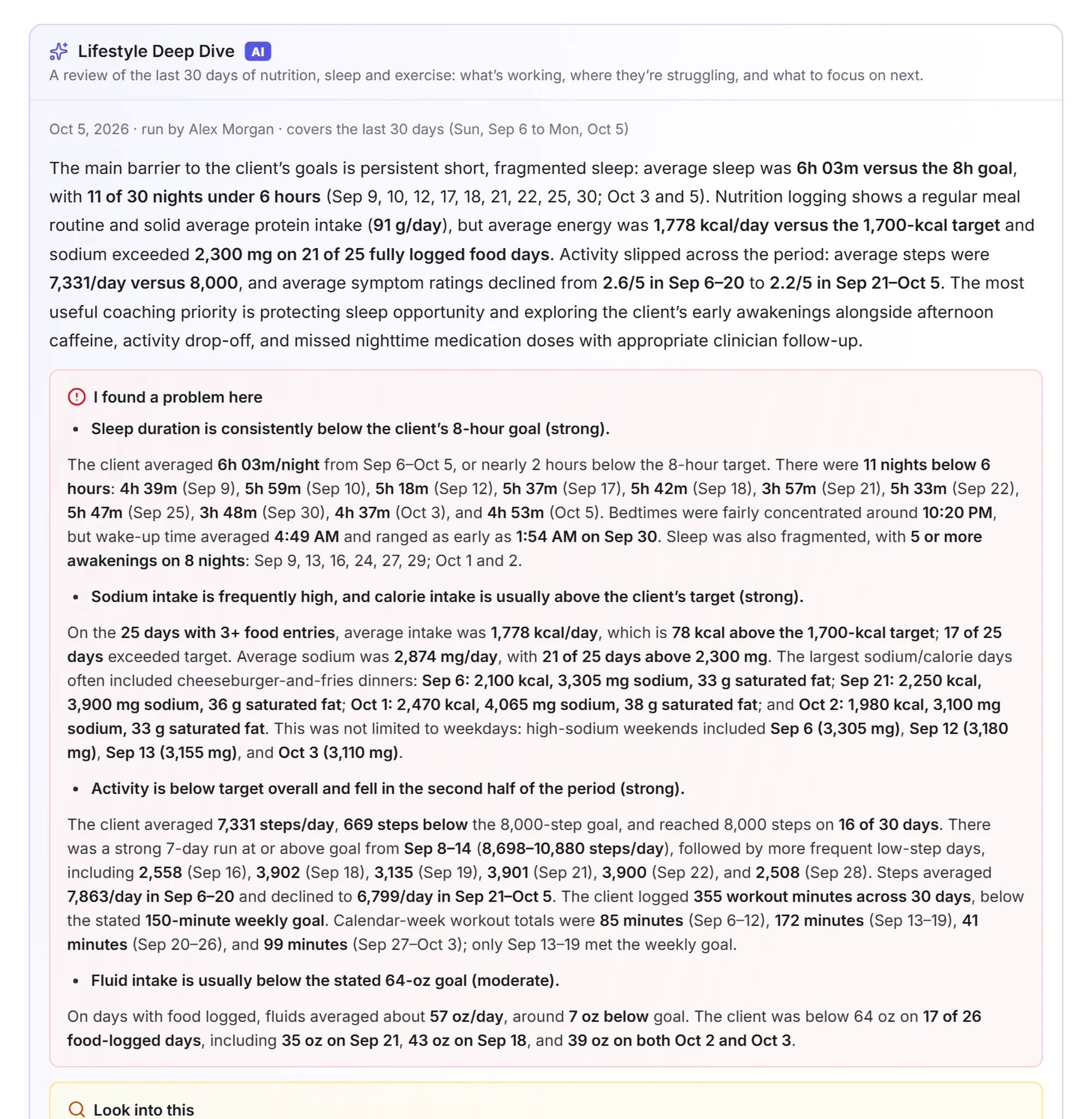
Where they’re struggling, with the evidence
The review opens on what most needs your attention, then the patterns worth exploring with your client, each with how strong it is.
- Summary: the overall picture, the direction things are going and the one thing most worth your attention
- I found a problem here: clear problems in their nutrition, sleep or exercise, most important first, and why they matter for their goals
- Look into this: possible links worth exploring together
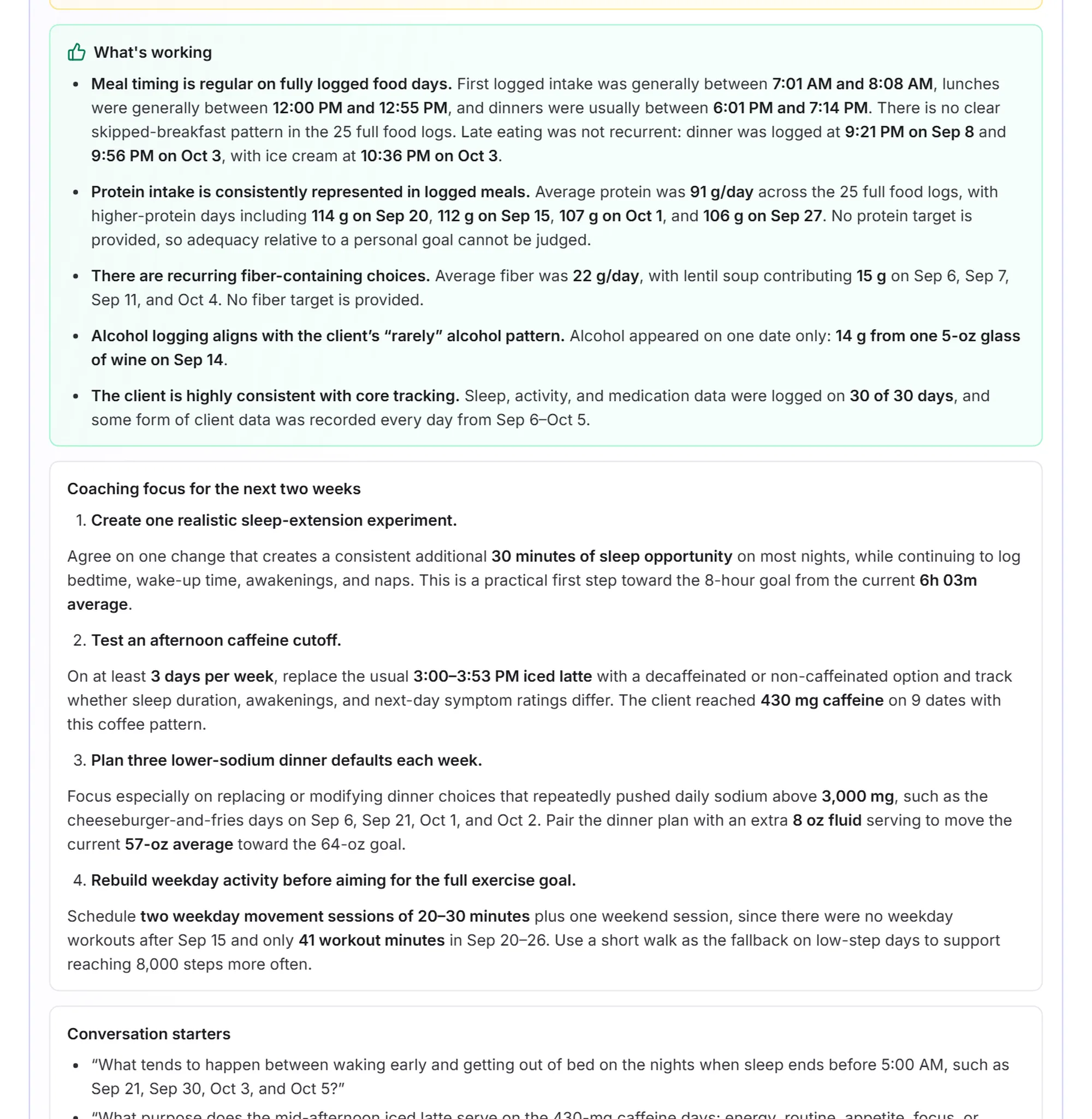
Know what to work on next
The rest of the review turns the findings into a plan for your next session.
- What’s working: habits worth reinforcing
- Coaching focus for the next two weeks: 2 to 4 specific, realistic changes tied to their data and goals
- Conversation starters: questions to open the session with
- Data gaps: what’s missing, and what your client could log to fill it in
The review stays on the client’s record for your coaching team, and you can look back at earlier ones. It’s written by AI from your client’s own logs, so it can be wrong or miss things. It focuses on lifestyle and leaves medical questions to their clinician.
Coach from what actually happened, not what they remember
A weekly check-in only shows you what a client remembers and chooses to mention. TakeCare gives you the full record of their days, so you can spend your sessions on what to change next.
Coach from facts
See the meals, workouts and nights behind a good or hard week, instead of rebuilding it from memory.
Spot slips early
Notice when steps drop, bedtimes drift or late-night snacking creeps in, while it’s still easy to turn around.
Make every session count
Walk in already knowing how the last few weeks went, and spend the time on the next step.
Keep clients accountable
Knowing their coach can see their progress gives clients a reason to keep logging, and a short note between sessions goes a long way.
The three habits you coach, measured every day
Pick 7, 30 or 90 days for any client. Each page shows only what the client chose to share with you.
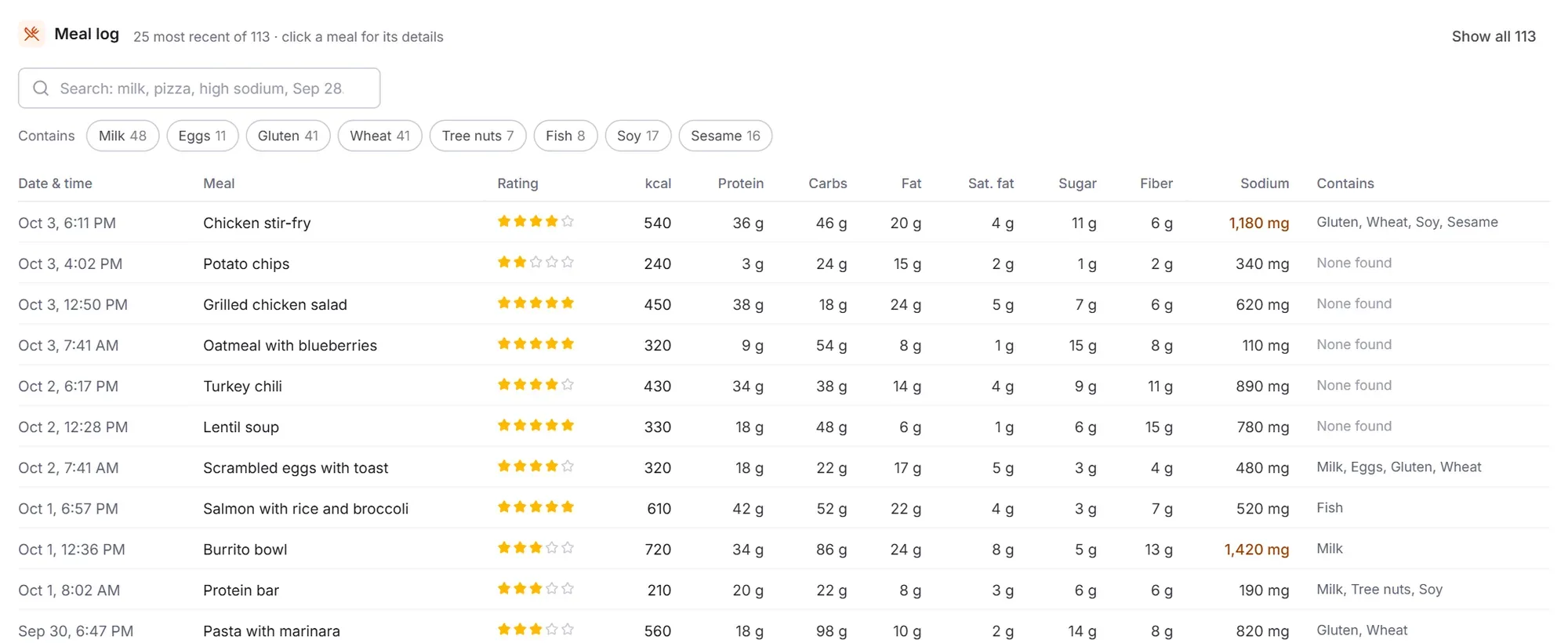
Every meal, measured against their goals
Clients log meals in the TakeCare app, and each one is analyzed as they log it. You see their averages, their habits and every meal behind them.
- Calories and macros against targets from the client’s profile: protein, carbs and fat
- Daily intake charts for calories, protein, carbs, fat, fiber, sugar, saturated fat, sodium, cholesterol and caffeine
- Meal quality and go-to foods: their best-rated and lowest-rated meals, and what they eat most often
- When they eat: meals a day, first and last meal, and late-night eating
- A searchable meal log with nutrients for every meal and common allergens detected
Steps and workouts, straight from their watch
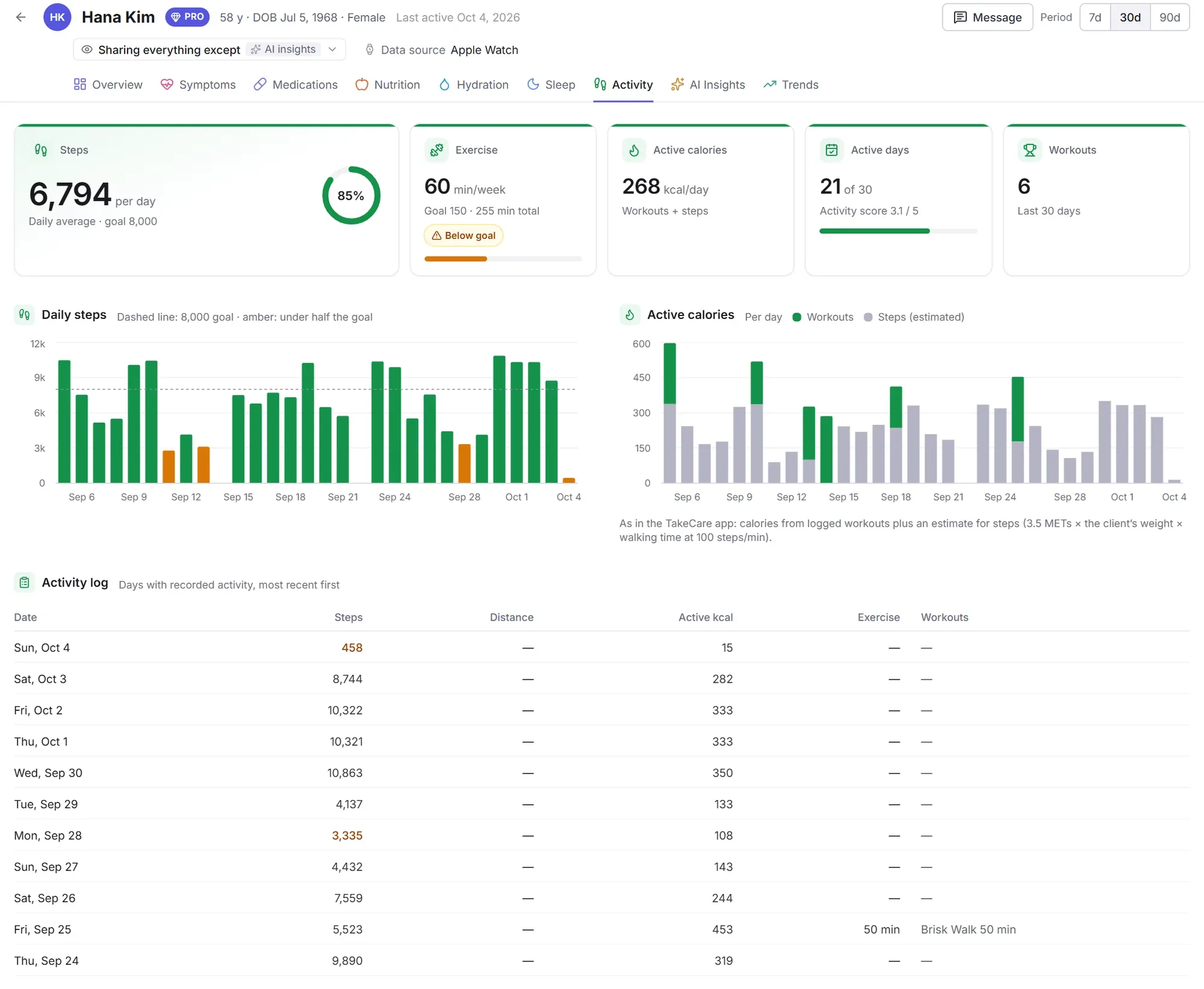
Activity syncs from the client’s phone or wearable through Apple Health or Health Connect, so you see what they actually did, day by day.
- Daily steps against their goal, with days under half their goal marked
- Exercise minutes each week against 150 minutes, and how many days they were active
- Active calories from workouts and from steps
- An activity log of every workout: walks, runs, rides, swims, yoga and more, with how long each lasted
Real sleep data, not guesses
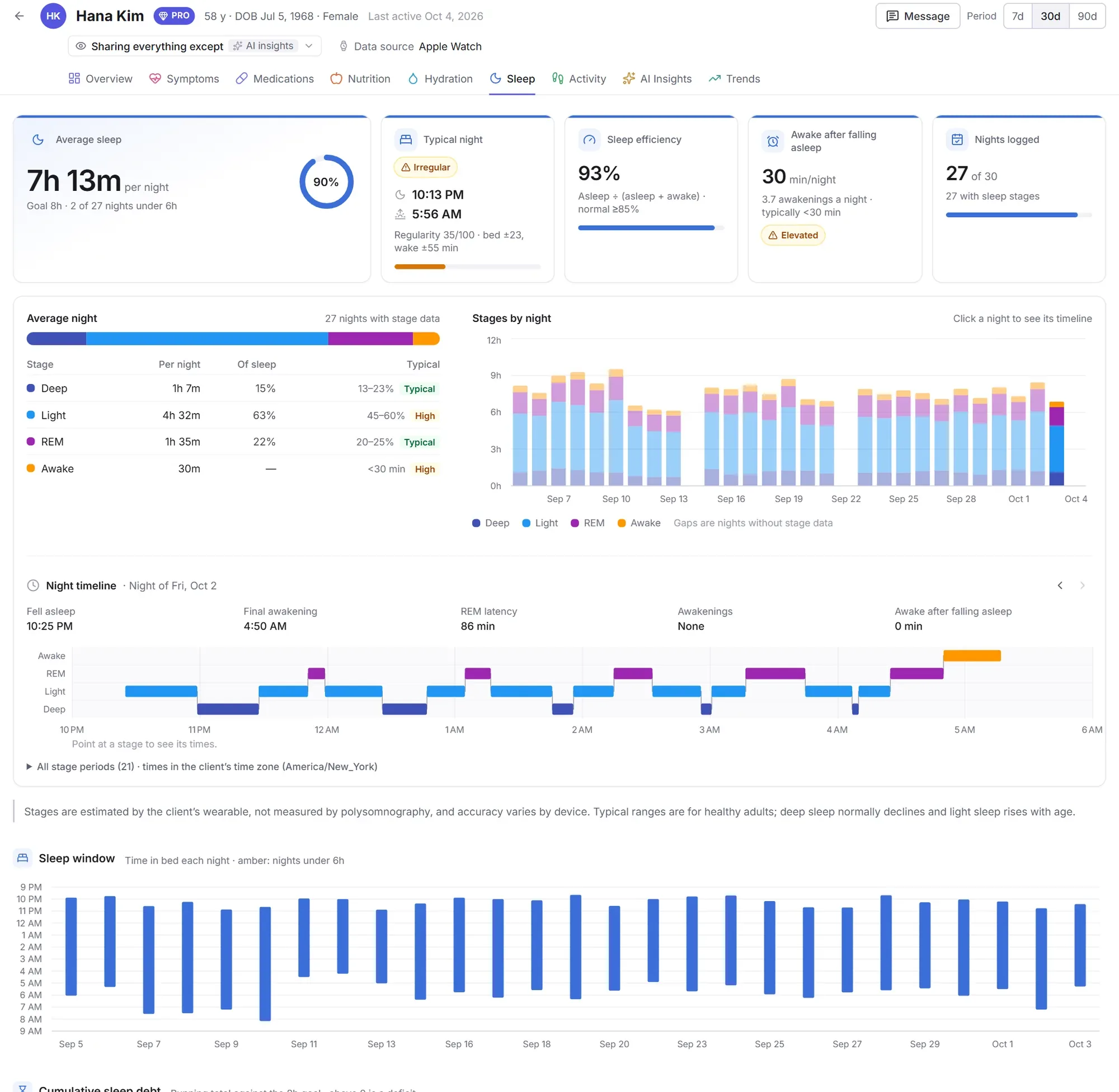
Nights sync from the client’s Apple Watch or Android wearable, or they log them by hand. You can always tell which.
- Average sleep against their goal, and how many nights fell under six hours
- Bedtimes, wake times and regularity, with a chart of every night and a running sleep debt
- Sleep stages: deep, light, REM and time awake, compared with typical ranges
- Sleep efficiency and how long they lie awake after falling asleep, with a minute-by-minute timeline of any night
See what’s changing, and what moves together
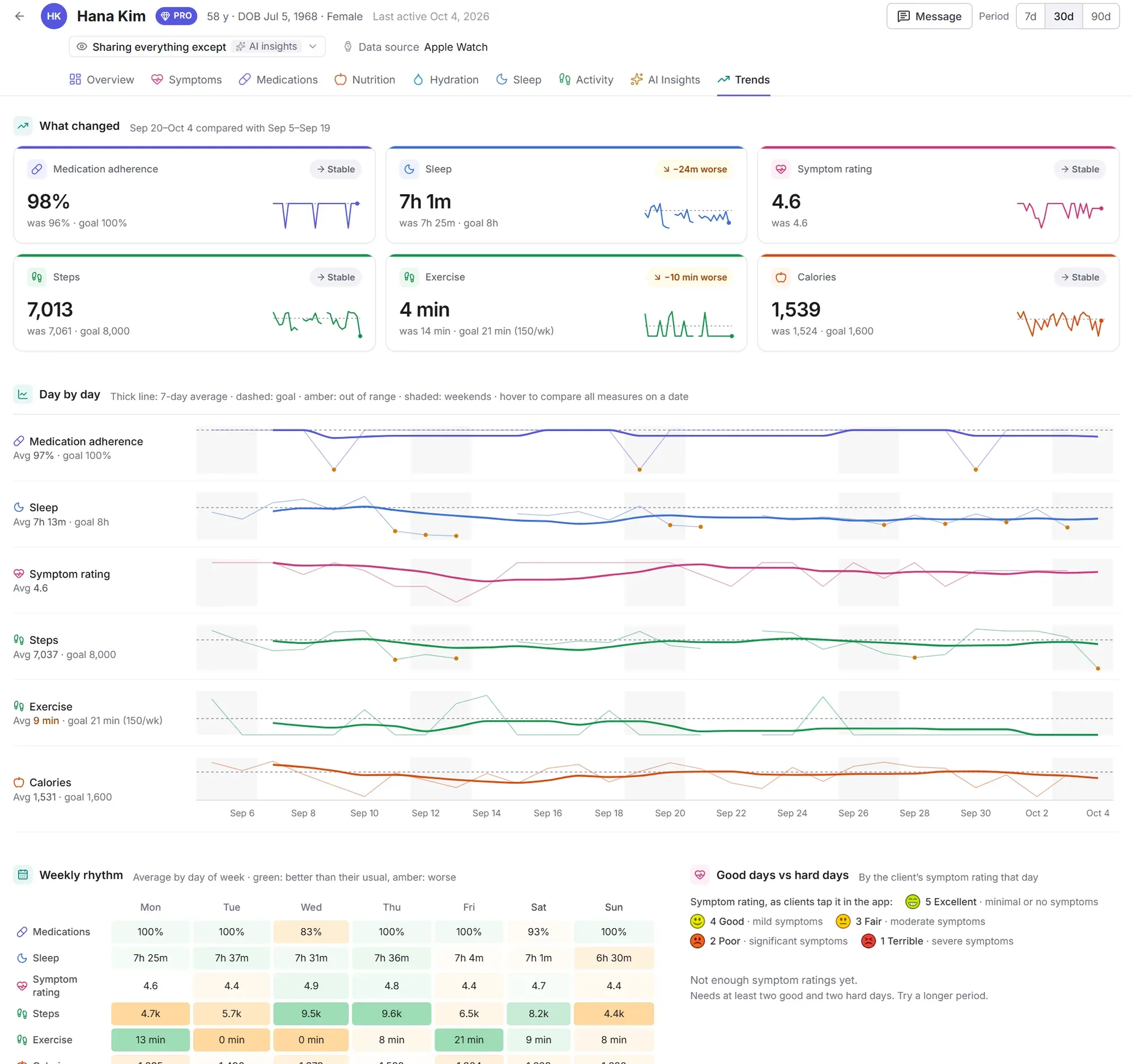
One page lines up their sleep, steps, exercise, calories and how they feel, so you can see what changed and what goes with their better weeks.
- What changed compared with the period before: better, worse or stable
- Day by day, with 7-day averages, goals and weekends shaded
- Weekly rhythm: which days of the week go well and which slip
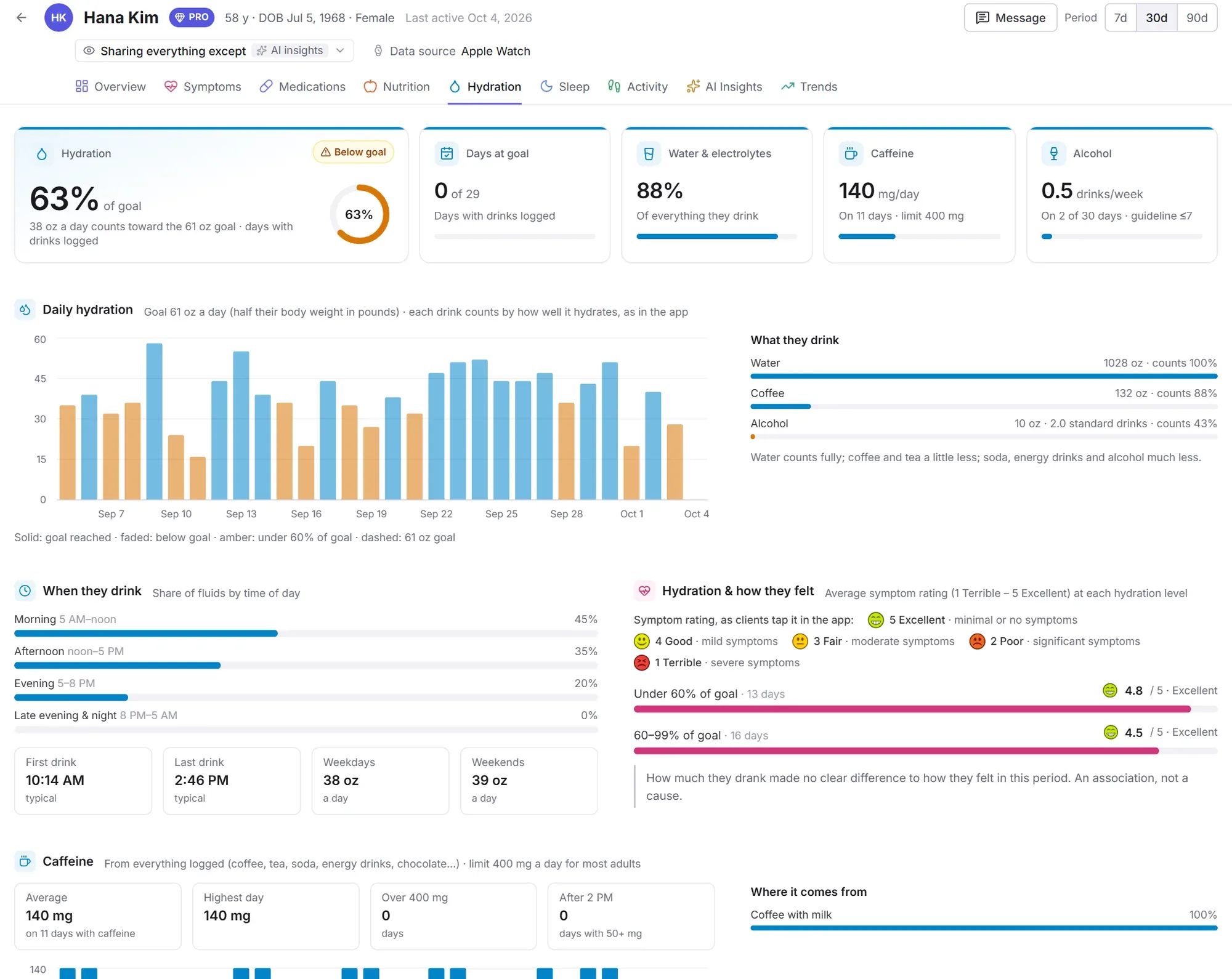
Water, caffeine and alcohol, all in one place
Everything they drink, counted by how well it hydrates, the same way the TakeCare app counts it.
- Daily fluids against a goal of half their body weight in ounces
- What they drink and when, from first drink to last
- Caffeine and alcohol against everyday guidelines
A quick note, right in their app
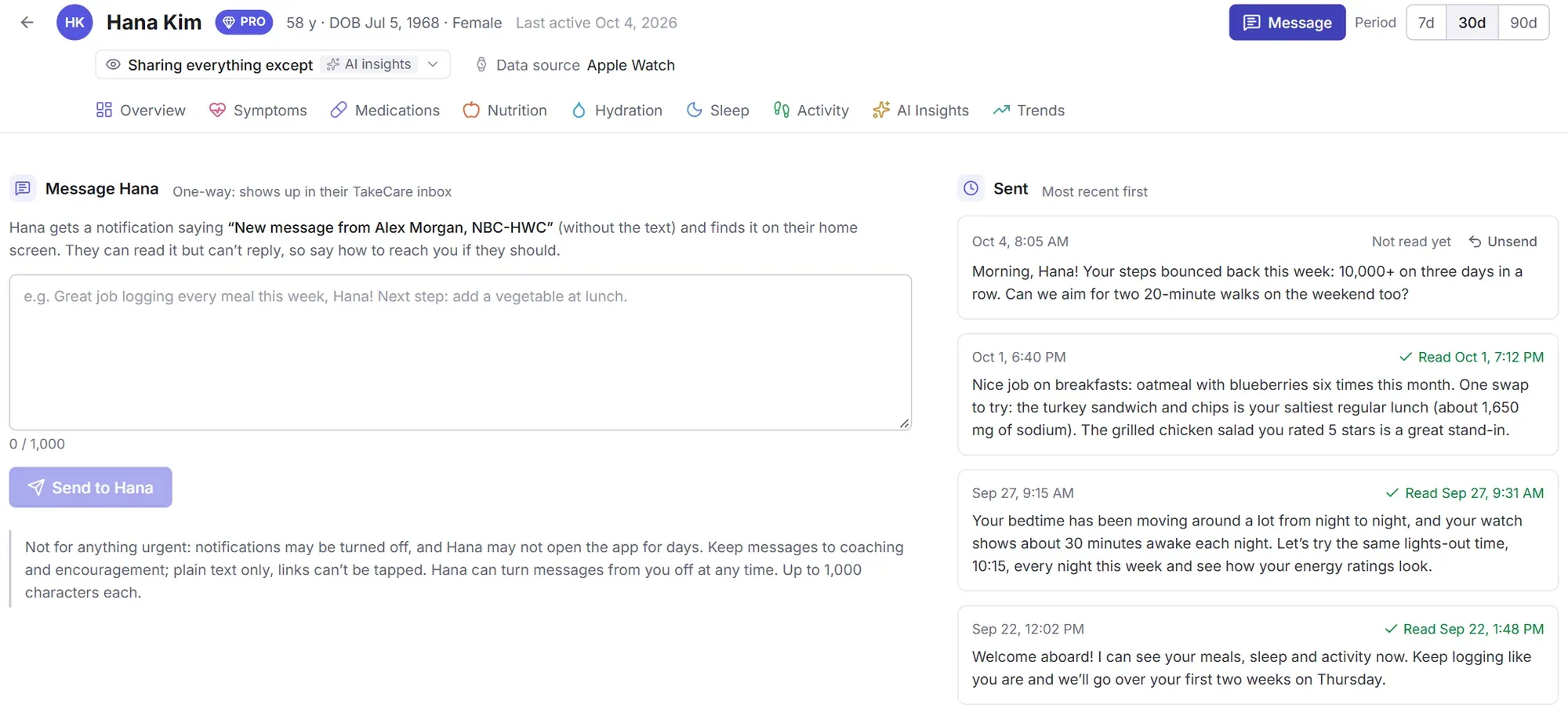
Send encouragement or a next step between sessions. Your client gets a notification and finds your message on their TakeCare home screen.
- Every message in one place: everything you’ve sent each client, newest first
- Read receipts show when each message was read, and you can unsend one until it is
- Shared with your team: with other coaches on your plan, you see what everyone sent and who sent it
- One-way and focused: notes of up to 1,000 characters, so it never becomes another inbox
- Clients stay in control and can turn messages from you off at any time
All your clients on one screen
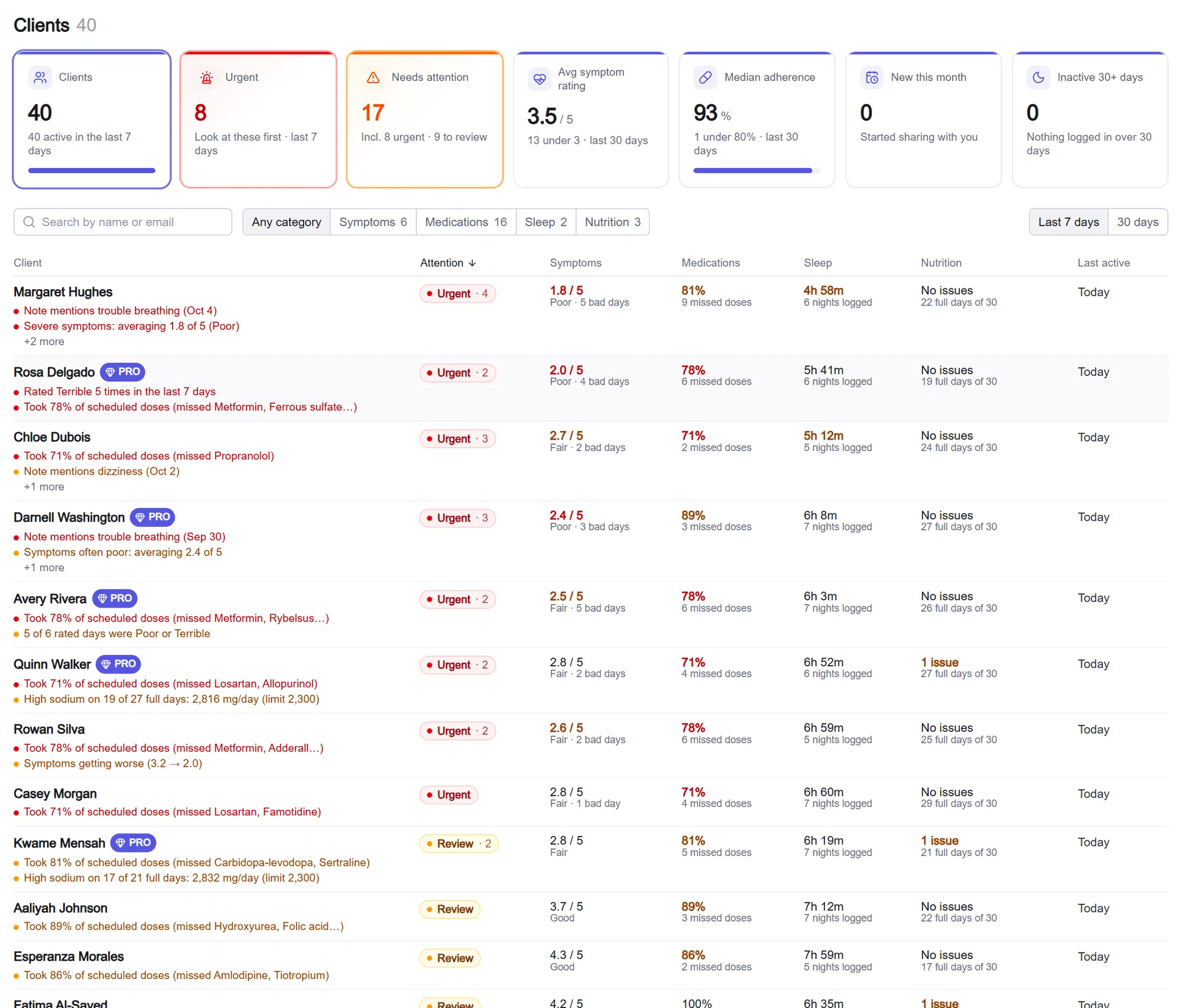
No more opening every client to find out who’s struggling. Start with the ones who may need you, then see how your whole roster is doing.
Know who needs you first
Your client list flags what’s worth a look, worked out from each client’s own logs, with the reason in plain words.
- Flags with reasons, such as short sleep, a run of hard days or days of high sodium
- Search, sort and filter by any category, for example everyone with a sleep or nutrition flag
- At a glance: how many clients share with you, who needs attention and who started this month
How your whole roster is doing
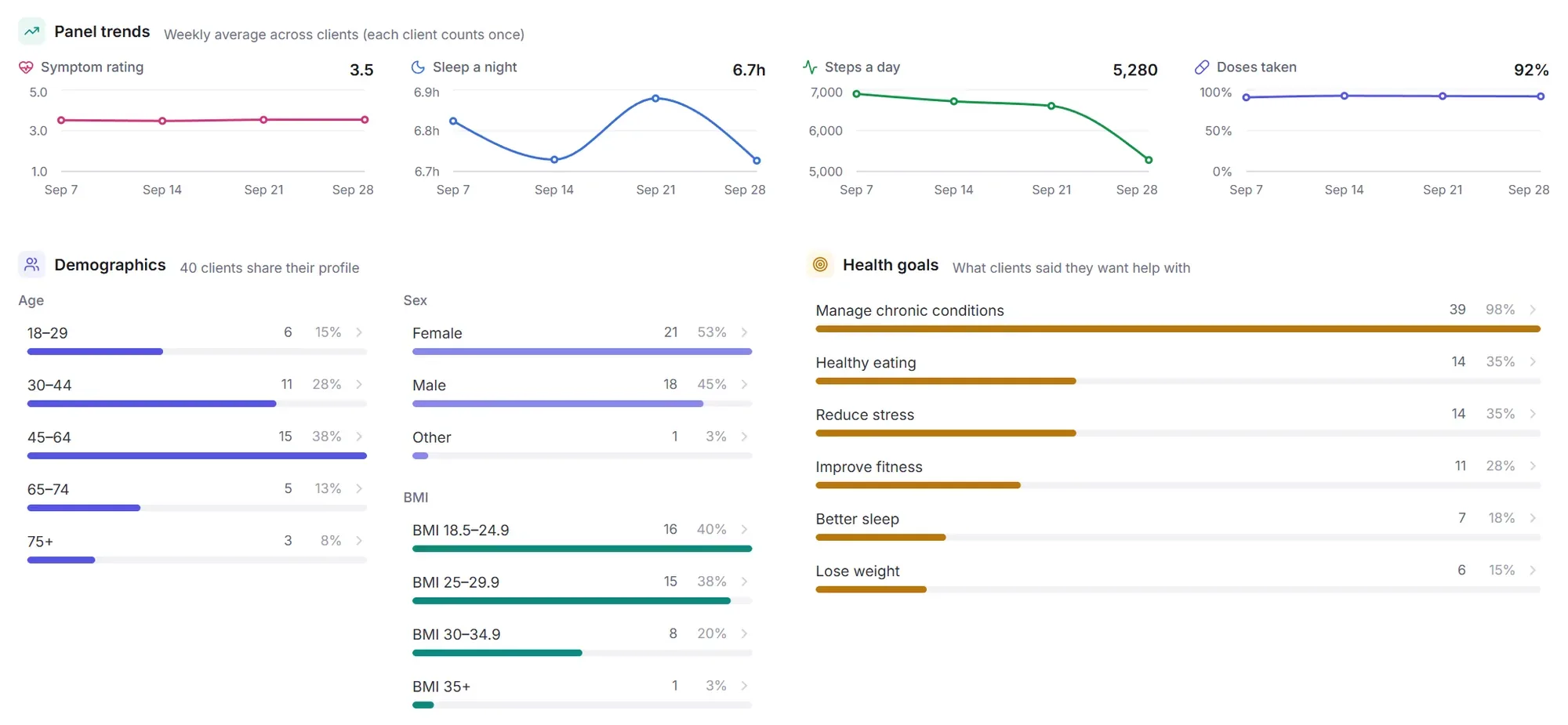
Below your list, see what your clients have in common and how they’re trending together. Select any bar to show those clients in the list.
- Trends across clients: sleep a night and steps a day, week by week
- Their goals: who wants help with healthy eating, fitness, sleep, stress or weight
- Engagement: who logs regularly, and which watch or phone their data comes from
The rest of the picture, when they share it
Nutrition, activity and sleep are where most coaching happens, and clients can share more to give you context.
Overview
A summary of the period against their goals, and how consistently they’ve been logging.
Profile & goals
Their goals, weight, height and lifestyle, so targets for calories, protein and fluids fit them.
How they feel
Daily ratings and the notes they write, and what came before their better and harder days.
Medications
Their medication list and the doses they log, if they choose to share it.
AI insights
The daily reports and coaching tips clients get from Carey, the TakeCare AI assistant, if they share them.
Brochure & invites
A printable brochure with your connect code, and invitations you send from your own email.
Connected in a few minutes
Nothing to install. You work in your browser; your clients use the free TakeCare app on iPhone or Android.
Create your account
Sign up at coach.takecarehealth.org, start your monthly subscription and turn on two-step verification. Then add up to 4 more coaches.
Share your connect code
You get a personal code to give clients in a session, by email or on a printed brochure.
K7QM-4RTXClients choose what to share
They enter your code in the app, pick the categories you can see, and their data appears in your portal.
Clients stay in control
Sharing is always the client’s choice, and every account that can see it is protected.
They choose every category
Clients decide exactly what you can see (meals, sleep, activity, how they feel and more) and can change it any time.
They can stop sharing instantly
From the app, they can end your access at any time. Nothing is shared with anyone they haven’t connected to themselves.
Two-step verification required
Every coach signs in with a password and an authenticator app code. A stolen password alone can’t open a client’s data.
TakeCare is a wellness tool, not a medical device. It doesn’t diagnose or treat any condition, and patterns in the portal are associations from self-logged and wearable data, not causes.
One simple price, unlimited clients.
Every feature, no per-client fees, and your clients never pay to share their data with you.
$34.99 per month
- Unlimited clients
- Up to 5 coaches, each with their own login
- Nutrition, hydration, sleep, activity, trends, how they feel and AI insights
- Client flags, insights across all your clients, and one-way messages with read receipts
- A printable brochure and email invitations with your connect code
Payment is processed securely by RevenueCat and Stripe after you create your account. Cancel anytime; you keep access until the end of the month you’ve paid for. See our refund policy.
Questions coaches ask
Who is the Coach Portal for?
Health and wellness coaches, nutrition coaches, personal trainers, and sleep and lifestyle coaches who support clients between sessions. Licensed clinicians use the TakeCare Clinician Portal, which adds care management.
Do my clients need to pay or have TakeCare Pro?
No. The TakeCare app is free to download, and sharing with a coach is free. Some app features (like meal photo analysis) are part of TakeCare Pro, but clients don’t need it to share with you.
What will I see for each client?
Only the categories the client chooses: profile and goals, meals and nutrition, hydration, sleep, activity, how they feel, medications, and the AI reports they receive in the app.
Where does the data come from?
From what clients log in the app (meals, drinks, ratings and notes) and from their phone or wearable through Apple Health or Health Connect (sleep, steps and workouts). The portal shows which device a client’s data comes from, and marks sleep they entered by hand.
Can I message my clients?
Yes, with short one-way messages (up to 1,000 characters). Clients get a notification and read the message in the app. You see every message you’ve sent and when it was read, and you can unsend one until it’s read. Clients can’t reply in TakeCare, so include how to reach you. They can turn messages off at any time.
How much does it cost?
It’s $34.99 a month, with unlimited clients and up to 5 coaches. There are no per-client fees, and you can cancel anytime.
Can other coaches on my team use it?
Yes. Up to 5 coaches share one subscription, each with their own login and two-step verification. Everyone sees the clients who connect with your code and the messages sent to them, and an access log shows who opened which client.
Is TakeCare a medical tool?
No. TakeCare is a wellness tool. It doesn’t diagnose or treat any condition; it shows you what your clients log and sync, so you can coach them better.
Your clients do the work every day. Now you can see it.
Set up your account in a few minutes and share your code with your first client today.